Cheap datacenter proxies: billing, sizing and where they fit
Cheap datacenter proxies are billed per IP or per GB, but value is set by how many requests return data. How to measure it, size an order and pick the tier.
Quick summary · TL;DR
- Count useful responses, not addresses. A port is billed per month, so what it returns is requests times success rate; at a 25% success rate it takes four requests to get one useful response.
- On lenient targets a port's bill does not follow volume. A dedicated IPv4 port is billed per month with no per-GB meter, so a million requests are billed the same as ten thousand.
- Size by concurrency and country, not by the target's limit. A target's rate limit covers the whole job, so more ports never buy more pace on one site.
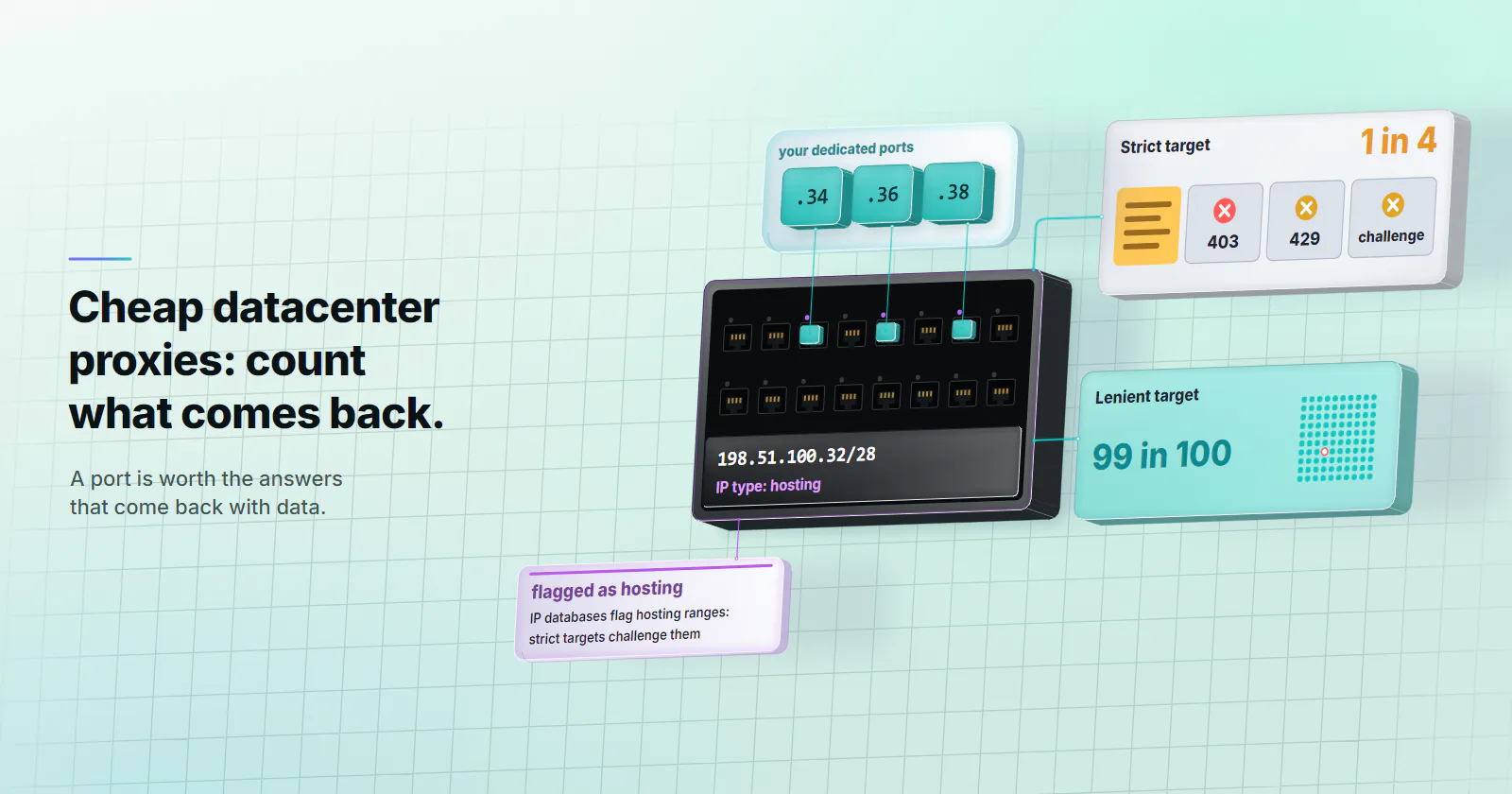
- Datacenter addresses are labelled as hosting. IP databases flag hosting ranges, so platforms with anti-bot scoring and strict retail challenge them on sight.
Cheap datacenter proxies are IP addresses hosted in data centers and sold per IP per month or per GB. They are the volume type of proxy: hosting providers run addresses at scale with no home device in the path. IP databases label those ranges as hosting, so what a port is worth is the share of requests that come back with data, not the count of IPs.
Most pages that rank for this term are rate cards and affiliate lists. They sort providers by entry price and stop there, which leaves out the number that decides the bill: how many of the requests the job sends come back with data.
A port that gets blocked three times out of four returns a quarter of the data it was bought for. The same port answering 99 times in 100 on a lenient target returns nearly all of it. What follows is the yield measure, a test to run before buying bulk datacenter proxies, a sizing rule, and the targets where another tier fits.
Cheap datacenter proxies, defined
The address lives in a data center. A datacenter proxy forwards traffic from an IP that belongs to a hosting or cloud provider, not to a home broadband line or a mobile carrier. The target sees that hosting network as the origin of the request.
The price unit is the address or the traffic. Budget proxies are sold two ways. Per IP per month, where the customer rents a set of addresses and the traffic through them is not metered. Or per GB, where the customer buys a traffic balance and the provider decides which address carries each request.
Cheap depends on the job. On a public API, a status page or a lenient catalog, cheap datacenter proxies are the right call. On a platform that scores hosting ranges, a home-network origin fits the job from the start.
What sets the datacenter proxy price
Three things set the datacenter proxy price.
Supply is industrial. A hosting provider holds address blocks and announces them from its own network. Adding a thousand addresses is a provisioning task, not a sourcing problem.
Nothing consumer-grade sits in the path. The exit is a server on a data center uplink, so throughput and uptime are those of the data center, not of someone’s home router or a phone in a drawer.
The label is public. IP intelligence databases classify networks by type. The MaxMind GeoIP web services documentation (checked September 29, 2026) lists hosting as a user_type value and an is_hosting_provider flag, now filed under its anonymizer object, that is true when an address belongs to a hosting provider. Any site that buys such a database can see a datacenter origin on the first request. The low price is the other side of that label.
Shared vs dedicated datacenter proxies
Shared pools put many customers on the same addresses, the core split in dedicated vs shared proxies. They split the cost across customers, and that comes with the neighbour problem: if another customer on the same address hammers a target, the block lands on everyone using it.
Dedicated proxies give one customer each address for the term. The per-IP price is higher, but the block history during the term is the customer’s own. A rate limit hit is then a signal about the customer’s own request pattern, which the customer can fix.
proxymint sells dedicated IPv4 ports only. Each port comes with its own username and password and an HTTP and a SOCKS5 endpoint, HTTP and SOCKS5 both included. The address is chosen by country at order time and does not rotate.
Per IP vs per GB pricing
Which billing model fits depends on two numbers: bytes per request and requests per month.
A port has no per-GB meter. The datacenter proxies page describes IPv4 ports as carrying no bandwidth cap under normal use, so a port costs the same whether it moves 1 GB or 100 GB in the month. A per-GB model charges every byte.
Page weight is where the gap opens. The HTTP Archive Web Almanac 2025 page weight chapter (published January 15, 2026) puts the median mobile home page at 2.6 MB and its HTML document at 33 KB. A thousand full renders at that weight move about 2.6 GB. The same thousand pages fetched as HTML move about 33 MB.
A per-GB balance, the model behind pay as you go proxies, suits light HTML fetches, and its bill follows page weight on full renders. A port is billed the same either way.
The datacenter page also lists an IPv6 line billed per GB, the subject of IPv6 proxies; the rest of this guide covers the IPv4 ports.
Useful responses per port
The metric that ranks low cost proxies for scraping is yield:
useful responses per month = requests per month x success rate
Success means a response with the data in it: a 2xx status with the expected content, not a challenge page, a 403 or a 429. RFC 6585 section 4 (April 2012) defines 429 Too Many Requests as the answer to a client that has sent too many requests in a given amount of time. A 429 costs a request and returns nothing.
On a lenient target a port’s monthly bill is fixed, so every extra request it serves adds yield without adding to the bill.
On a strict target the formula turns. At a 25% success rate, four requests go out for every useful response, and that is before the retries. Every failed request also costs time, a worker slot and some of the target’s patience, which often pushes the success rate lower still.
Port vs per GB, side by side
For a per-GB tier the same idea runs on bytes: GB per 1,000 successes = GB per request x 1,000 / success rate, and the bill follows that figure. For a port it runs on requests. Put both numbers from the reader’s own test next to each other, alongside whether the target accepts hosting ranges at all.
What a datacenter proxy bill is made of
Ports. Dedicated IPv4 ports are billed per port per month, and the per-port rate falls in volume bands as the order grows. The bands and their edges are on the pricing page; price the exact port count the job needs there.
The term. Monthly plans renew monthly; a 3 or 12 month term is billed in full at the start.
The whole order takes the rate for its size, so the one number to get right is the port count. The sizing rule below sets it.
Targets that call for another tier
Some targets score the network type, and on those the tier is chosen before the first request.
Social platforms and marketplaces with anti-bot vendors. They classify hosting ASNs on sight, and a hosting origin gets a challenge page.
Strict retail. Retail sites that refuse hosting ranges outright are a residential job from the start.
Jobs that need a home-network view. Ad verification on home networks, local results by city, content that differs for home users. Use rotating residential proxies.
Accounts tied to one login location. A seller dashboard or a partner system that expects one steady address wants static ISP proxies: one ISP-registered address, assigned to your order for the whole billing term.
The tier fits bulk collection from targets without anti-bot scoring, API polling with a key, uptime and latency monitoring, load testing of the reader’s own systems from many addresses, and SEO tooling on lenient engines and regions.
Test before buying bulk datacenter proxies
A rate card cannot say whether a target accepts datacenter addresses. A small order can. The test takes an afternoon:
- A few ports in the job’s country. Buy a handful of ports in the country the job needs.
- A real sample. Pick 50-100 pages or endpoints that represent the real job.
- The job’s own pace. Send requests through one port at the pace the job will use, within the target’s terms.
- Four outcomes counted. Count 2xx with the expected content, 403, 429 and challenge pages, and divide the first count by the total for the success rate.
- Yield side by side. Put the success rate into the yield formula above, next to the same test on a small residential package.
If the success rate stays high, the datacenter tier fits the job. If it is low, read it as the target’s answer and check its terms and official API before going further.
Size the order by concurrency
An order of cheap datacenter proxies is sized by how many parallel workers the job runs and how many countries it covers.
ports needed = parallel workers / workers per port, per country
A target’s rate limit applies to the job as a whole: splitting the same pace across more ports does not make it acceptable, so the total stays inside what the target’s terms or API allow. Add one or two standby ports for failover.
# One request through one port, HTTP and SOCKS5
curl -x http://HOST:PORT -U "USERNAME:PASSWORD" https://example.com/ -o /dev/null -w "%{http_code}\n"
curl -x socks5://HOST:PORT -U "USERNAME:PASSWORD" https://example.com/ -o /dev/null -w "%{http_code}\n"
HTTPS sites run through either scheme end to end. The proxy URL itself uses http:// or socks5://.
Free vs cheap proxies
Free proxy lists look like the cheapest proxies of all and cost the most in practice. The operator is unknown, anything sent in plain text can be read or changed on the way, the addresses are shared with everyone who found the same list, and there is no one to write to when it breaks. A paid dedicated port, billed per month, is a known exit with its own login. The full list of risks is in are free proxies safe.
Datacenter or another tier, by target
- Lenient targets, APIs, monitoring, load tests: cheap datacenter proxies, sized by concurrency, where a fixed monthly port bill covers every request.
- Targets that challenge hosting ranges: rotating residential per GB, where a consumer origin gets the data.
- Full-render jobs on lenient targets: ports, where page weight does not change the bill.
- One address for weeks: static ISP per IP per month.
- Not sure: run the small-port test first, then compare useful responses per request and bytes per useful response for each tier before picking one.
The rate card sets what a port costs; the target decides what it returns.
Frequently asked questions
Cheap datacenter proxies are IP addresses hosted by data center and cloud providers, sold per IP per month or per GB of traffic. They are priced low because hosting providers run addresses at scale. The tradeoff is that IP databases label those ranges as hosting, so some sites block or challenge them.
They are worth it on targets without anti-bot scoring: public APIs, monitoring, load tests and lenient catalogs, where one port can serve a million requests a month on the same fixed monthly bill. Social platforms, marketplaces with anti-bot vendors and strict retail call for a consumer-origin tier, because most requests from a hosting address fail there. Measure the success rate on the real target before buying in bulk.
Measure how many requests come back with data on the real target, and pick the billing unit that matches the traffic. A datacenter port is billed per month with no per-GB meter, so on a lenient target every extra request it serves is covered by the same bill. On a target that scores hosting ranges, a residential origin returns the data, billed per GB.
Datacenter proxies are sold per IP per month or per GB, and the per-IP rate usually falls as the order grows. On proxymint, dedicated IPv4 ports are billed per port per month, the per-port rate falls in volume bands as the order grows, and every band is on the pricing page.
Shared datacenter proxies usually cost less per IP because many customers use the same addresses. The discount comes with the neighbour problem: another customer who overloads a target can get the shared address blocked for everyone. Dedicated proxies cost more per IP, but the address history during the term belongs to one customer.
It depends on the billing model. Per-IP plans usually do not meter traffic, while per-GB plans charge every byte. proxymint IPv4 ports carry no bandwidth cap under normal use, and its IPv6 line is metered per GB.
Cheap datacenter proxies are paid ports from a known operator, each with its own login, billed per port per month or per GB. Free datacenter proxies come from public lists: the operator is unknown, unencrypted traffic can be read or changed in transit, the addresses are shared with everyone who found the list, and nobody answers when they fail.
Researched and drafted with AI tools, then checked against our publishing rules before it went live: 3 outside links, 8 links to other proxymint pages, no prices and a fact-check pass against our product records. How we write.