
reqwest proxy: HTTP, SOCKS5, auth and rotation in Rust
reqwest proxy setup for Rust on reqwest 0.13: Proxy::all, credentials, the socks feature, socks5h, env variables and NO_PROXY, pooling, rotation and errors.
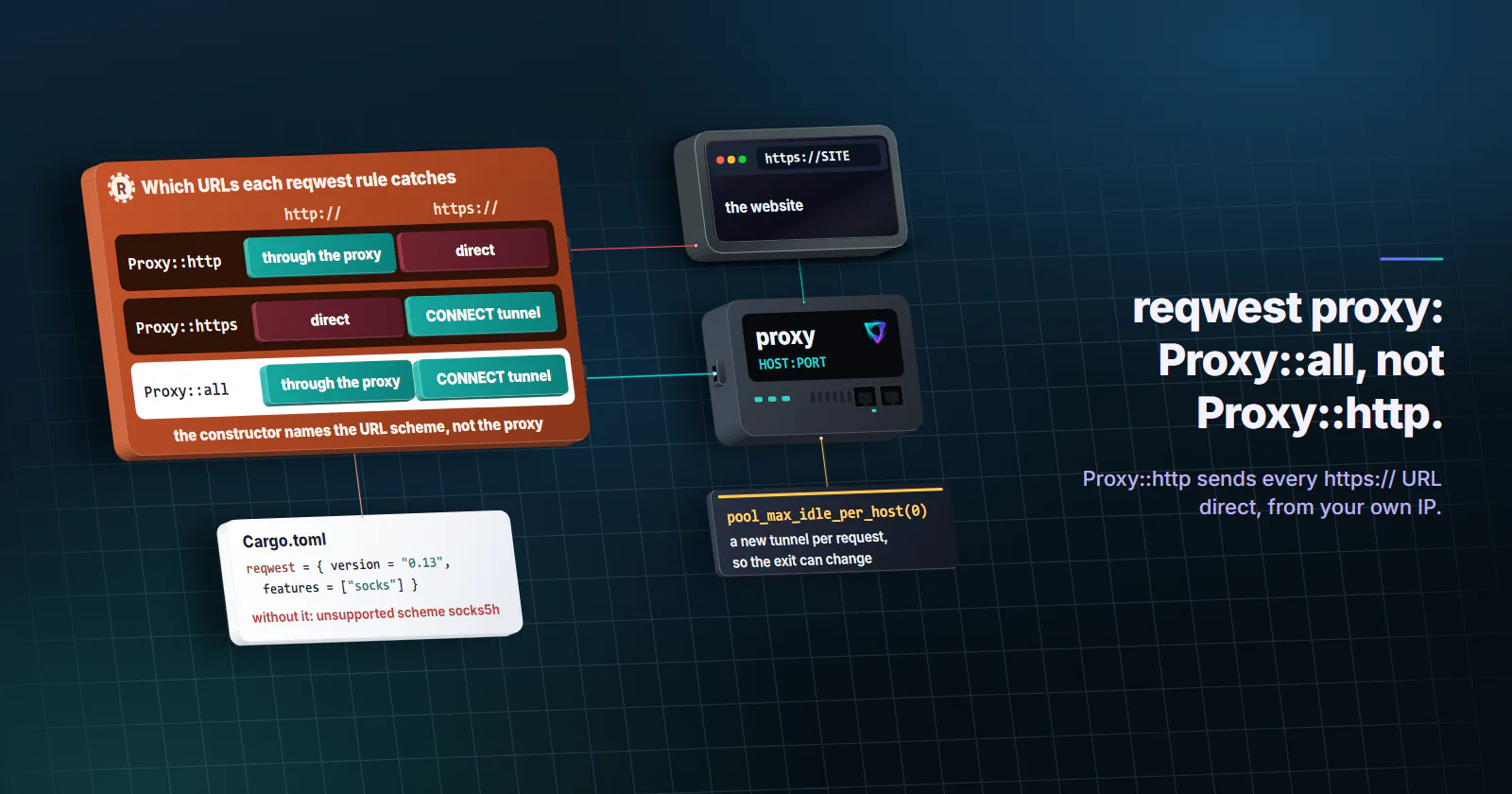
Quick summary · TL;DR
- One call does the setup. Pass Proxy::all("http://USERNAME:PASSWORD@HOST:PORT") to ClientBuilder::proxy. HTTPS URLs then go through a CONNECT tunnel with no other option.
- Proxy::http only covers http:// URLs. The constructor names the target scheme, so a Proxy::http rule sends every https:// request direct. Use Proxy::all.
- SOCKS5 needs the socks feature. Without it a socks5h:// URL compiles and then fails on every request with unsupported scheme socks5h.
- An explicit proxy turns off the environment. After .proxy(), HTTPS_PROXY and NO_PROXY are ignored; add NoProxy::from_env() to keep the bypass list.
To set a reqwest proxy, build the client with Client::builder().proxy(reqwest::Proxy::all("http://USERNAME:PASSWORD@HOST:PORT")?). Proxy::all covers both http:// and https:// URLs, and HTTPS targets travel through a CONNECT tunnel with no extra code. SOCKS5 needs reqwest’s socks feature and a socks5h:// URL. Calling .proxy() also switches off the HTTP_PROXY and HTTPS_PROXY environment variables for that client.
Most failures come after that line. Any Proxy::http rule sends every https:// request direct. Any socks5h:// URL compiles without the socks feature and only fails at request time. basic_auth() quietly rewrites a password that contains %41. And a rotating setup returns the same IP for a whole run, because reqwest keeps the tunnel open and reuses it.
Each of those comes from how a Rust reqwest proxy setup matches URLs to rules and pools connections. Every snippet below compiles on reqwest 0.13.5 (released 2026-09-08) with Rust 1.97, and the behaviour matches the reqwest Proxy documentation and the reqwest changelog (both checked October 18, 2026).
reqwest proxy setup in code
Start with the dependencies. socks is only needed for SOCKS proxies and blocking only for the synchronous client; HTTP proxy support and the environment-variable proxy are built in, and there is no proxy feature to turn on.
[dependencies]
reqwest = { version = "0.13", features = ["socks"] }
tokio = { version = "1", features = ["full"] }
percent-encoding = "2"
Here is the working minimum, with the connection details read from environment variables so they stay out of source control:
use percent_encoding::{utf8_percent_encode, NON_ALPHANUMERIC};
use std::{env, time::Duration};

#[tokio::main]
async fn main() -> Result<(), Box<dyn std::error::Error>> {
    let user = env::var("PROXY_USER")?;
    let pass = env::var("PROXY_PASS")?;
    let host = env::var("PROXY_HOST")?;
    let port = env::var("PROXY_PORT")?;

    // Percent-encode the login so @, :, / or % in a password cannot break the URL.
    let proxy_url = format!(
        "http://{}:{}@{host}:{port}",
        utf8_percent_encode(&user, NON_ALPHANUMERIC),
        utf8_percent_encode(&pass, NON_ALPHANUMERIC),
    );

    let client = reqwest::Client::builder()
        .proxy(reqwest::Proxy::all(&proxy_url)?)
        .connect_timeout(Duration::from_secs(10))
        .timeout(Duration::from_secs(30))
        .build()?;

    let ip = client
        .get("https://httpbingo.org/ip")
        .send()
        .await?
        .error_for_status()?
        .text()
        .await?;
    println!("{ip}");
    Ok(())
}
Build one Client and share it. It is cheap to clone, keeps a connection pool, and holds the proxy rules for its whole life: there is no per-request proxy option in reqwest. reqwest::blocking::Client takes the same Proxy value:
let client = reqwest::blocking::Client::builder()
    .proxy(reqwest::Proxy::all("http://USERNAME:PASSWORD@HOST:PORT")?)
    .build()?;
Only a handful of calls matter:
| Call | What it does |
|---|---|
Proxy::all(url) | Proxies http:// and https:// URLs |
Proxy::http(url) / Proxy::https(url) | Proxies only URLs with that scheme |
Proxy::custom(fn) | Picks a proxy per URL from a closure |
.basic_auth(user, pass) | Sets the proxy login (see the encoding note below) |
.custom_http_auth(value) | Sends a ready-made Proxy-Authorization value |
.headers(map) | Extra headers for the proxy itself |
.no_proxy(NoProxy) | Hosts that bypass this proxy |
ClientBuilder::proxy(p) | Adds a rule and disables the environment proxy |
ClientBuilder::no_proxy() | Removes every rule, environment included |
Proxy::http vs https vs all
The constructor names the scheme of the URL being requested, not the protocol of the proxy. Proxy::http("http://HOST:PORT") means “send http:// URLs to this proxy”. It does nothing for https:// URLs, and those go straight from your machine to the website. Even reqwest’s own documentation example is Proxy::http("https://secure.example"), and tutorials that copy it for a general setup send every HTTPS page from the machine’s own IP.
One client can hold several rules. reqwest checks them in the order they were added and uses the first match, so a Proxy::all added first hides every rule after it:
let client = Client::builder()
    .proxy(Proxy::https("http://USERNAME:PASSWORD@HOST_A:PORT")?)
    .proxy(Proxy::http("http://USERNAME:PASSWORD@HOST_B:PORT")?)
    .build()?;
Two smaller rules. Without a scheme, a URL such as HOST:PORT is read as http://HOST:PORT. And http:// is the right scheme for a normal HTTP proxy even when every target is HTTPS: the CONNECT tunnel carries the TLS session end to end. An https:// proxy URL means TLS to the proxy itself, and against a plain proxy port it hangs until the timeout (operation timed out).
Certificate errors through a proxy. Through a CONNECT tunnel the website’s certificate arrives untouched, so a certificate error that appears only through the proxy means something in the path re-signs HTTPS: a corporate TLS-inspection gateway, or a debugging proxy such as mitmproxy. reqwest 0.13’s default rustls backend checks certificates through the operating system’s trust store, so a CA installed there is accepted. Otherwise add it on the builder; add_root_certificate still works but is deprecated in 0.13.5:
let ca = reqwest::Certificate::from_pem(&std::fs::read("proxy-ca.pem")?)?;
let client = Client::builder()
    .proxy(Proxy::all("http://HOST:PORT")?)
    .tls_certs_merge([ca])
    .build()?;
Keep danger_accept_invalid_certs(true) out of production code: it accepts any certificate, including one from an attacker on the path.
reqwest proxy authentication
Credentials in the URL. The simplest form of reqwest proxy authentication is the URL itself: http://USERNAME:PASSWORD@HOST:PORT. reqwest sends Proxy-Authorization: Basic ... on the CONNECT for https:// targets and on the forwarded request for http:// targets, on the first try, without waiting for a challenge.
Encode the password. URL parsing splits on the last @, so a raw @ or : in a password usually survives, but a % followed by two hex digits is decoded: pa%41ss reaches the proxy as paAss. Percent-encoding every non-alphanumeric byte, as in the setup code, sends the password exactly as written.
basic_auth() decodes too. Proxy::all(url)?.basic_auth(user, pass) stores the login inside the proxy URL, and reqwest decodes that URL before it builds the header. On reqwest 0.13.5 a password abc%41 passed to basic_auth() arrives as abcA, and a%2Fb arrives as a/b. Passwords without % are unaffected.
use percent_encoding::{utf8_percent_encode, NON_ALPHANUMERIC};

let pass_enc = utf8_percent_encode(pass, NON_ALPHANUMERIC).to_string();
let proxy = Proxy::all("http://HOST:PORT")?.basic_auth(user, &pass_enc);
custom_http_auth(HeaderValue) is the other way out: it sends the header value you give it untouched, for a pre-built Basic token or a scheme other than Basic.
What a rejected login looks like. A 407 means the proxy did not accept the credentials (RFC 9110, section 15.5.8, June 2022). In reqwest it takes two shapes. For an http:// URL the 407 is an ordinary Response, so send() succeeds and status() is 407. For an https:// URL the tunnel never opens, so send() returns an error whose chain ends in tunnel error: proxy authorization required, with is_connect() true and status() empty. Causes on the proxy side are in the 407 Proxy Authentication Required guide.
reqwest SOCKS5 proxy
reqwest needs the socks feature for a SOCKS5 proxy. Without it, Proxy::all("socks5h://...") still compiles and the client still builds, then every request fails with unsupported scheme socks5h. That catches people who copy a SOCKS URL into a project that only has the default features.
let client = Client::builder()
    .proxy(Proxy::all("socks5h://USERNAME:PASSWORD@HOST:PORT")?)
    .build()?;
Your choice of scheme decides who resolves the website’s hostname:
| Scheme | Hostname resolved by | Use it when |
|---|---|---|
socks5h:// | The proxy | Default for scraping and geo-sensitive jobs |
socks5:// | Your machine, then the IP is sent | The proxy only accepts IP destinations |
socks4a:// | The proxy | Legacy SOCKS4 servers |
socks4:// | Your machine | Legacy, no username and password support |
With socks5://, your own resolver sees every hostname and the exit gets the IP your network chose, which can be a server near you rather than near the exit. On proxymint’s residential and mobile gateway, socks5h:// and HTTP CONNECT both resolve names on the proxy side, while plain socks5:// used the client’s own resolver (proxymint Lab #1, measured September 28, 2026). Why that matters is in the DNS leak guide.
The SOCKS5 login follows RFC 1929 (March 1996): username and password from the URL, percent-encoded the same way. Leave out the port and reqwest uses 1080. Wrong logins fail with SOCKS error: credentials not accepted. Leaving the login out against a proxy that requires one gives SOCKS error: server does not support user/pass authentication, which reads backwards: the client offered no credentials and the server refused that. See the SOCKS5 vs HTTP proxy comparison for when each protocol fits.
reqwest HTTPS_PROXY environment variable
Client::new(), or any builder without a .proxy() call, uses the environment. reqwest reads HTTPS_PROXY and https_proxy, HTTP_PROXY and http_proxy, ALL_PROXY and all_proxy (used when the scheme-specific one is missing), and NO_PROXY and no_proxy. Uppercase wins over lowercase. It also reads the macOS and Windows system proxy settings through the default system-proxy feature.
use reqwest::{Client, NoProxy, Proxy};

// Uses HTTPS_PROXY, HTTP_PROXY, ALL_PROXY and NO_PROXY because no .proxy() call is made.
let from_env = Client::new();

// Never uses a proxy, whatever the environment says.
let direct = Client::builder().no_proxy().build()?;

// An explicit proxy ignores the environment, NO_PROXY included. Pass NO_PROXY back in.
let explicit = Client::builder()
    .proxy(Proxy::all("http://USERNAME:PASSWORD@HOST:PORT")?.no_proxy(NoProxy::from_env()))
    .build()?;
Adding the first .proxy() call turns off the environment and system proxy entirely, so a NO_PROXY meant to keep internal calls direct stops working the moment someone adds an explicit proxy. Unlike curl, reqwest reads the uppercase HTTP_PROXY. It skips the environment when REQUEST_METHOD is set, the CGI signal, so an incoming Proxy: header cannot redirect a CGI program’s requests (httpoxy, July 2016).
reqwest no_proxy bypass list
NoProxy::from_string takes a comma-separated list and attaches it to one rule:
let proxy = Proxy::all("http://USERNAME:PASSWORD@HOST:PORT")?
    .no_proxy(NoProxy::from_string("localhost, internal.example, 10.0.0.0/8, ::1"));
A domain entry matches the domain and every subdomain, with or without a leading dot, so internal.example covers api.internal.example. IPv4 and IPv6 addresses and CIDR ranges match IP literals in the URL, not hostnames that resolve to them. * bypasses every hostname. Each rule carries its own list, so with several rules each one needs its own reqwest no_proxy entry.
Rotation and connection pooling
A Client keeps idle connections in a pool, up to 90 seconds by default. Through a proxy that pool holds the CONNECT tunnel, so every https:// request to the same host rides the same tunnel and leaves from the same exit. Checked against a logging proxy, three requests on one client opened one CONNECT. With pool_max_idle_per_host(0) the same three requests opened three.
A rotating gateway. For a reqwest rotating proxy behind one address, turn the pool off so each request opens a new tunnel, then count the exits:
use reqwest::{Client, Proxy};
use std::collections::HashSet;

let fresh = Client::builder()
    .proxy(Proxy::all("http://USERNAME:PASSWORD@HOST:PORT")?)
    .pool_max_idle_per_host(0)
    .build()?;

let mut exits = HashSet::new();
for _ in 0..10 {
    let ip = fresh.get("https://httpbingo.org/ip").send().await?.text().await?;
    exits.insert(ip);
}
println!("{} distinct exits in 10 requests", exits.len());
Run it once with the pool on and once with it off. Each new connection costs a TCP and TLS handshake, so keep the pooled client for sticky sessions, where one exit is the goal. On proxymint the rotation mode is set on the order (a new IP every request, a timer from 5 to 60 minutes, or sticky while the device stays online) and can be changed later without new credentials, so the Rust code stays the same.
Several proxies. With a reqwest rotating proxy list, Proxy::custom looks like the place for rotation, but the pool overrides it. With a closure that alternated between two proxies, four https:// requests on one pooled client all went through the first proxy, because reqwest reused the tunnel it already had open to that host. Turning the pool off restores the alternation. One client per proxy, picked in turn, is cleaner and keeps each proxy’s pool:
use reqwest::{Client, Proxy};
use std::sync::atomic::{AtomicUsize, Ordering};

struct ProxyPool {
    clients: Vec<Client>,
    next: AtomicUsize,
}

impl ProxyPool {
    fn new(urls: &[&str]) -> reqwest::Result<Self> {
        let clients = urls
            .iter()
            .map(|u| Client::builder().proxy(Proxy::all(*u)?).build())
            .collect::<reqwest::Result<Vec<_>>>()?;
        Ok(Self { clients, next: AtomicUsize::new(0) })
    }

    fn pick(&self) -> &Client {
        let i = self.next.fetch_add(1, Ordering::Relaxed);
        &self.clients[i % self.clients.len()]
    }
}
HTTP and SOCKS URLs can sit in the same list. Building a fresh Client for every request, as some rotation tutorials do, works but throws away the pool and its open connections on every call.
reqwest proxy errors, timeouts, retries
reqwest wraps proxy faults in one reqwest::Error. The top message is always error sending request for url (...); the useful part is further down the source() chain. These are the chains reqwest 0.13.5 produced against a local test proxy:
| Message to look for in the error chain | Flags | Cause | Fix |
|---|---|---|---|
tunnel error: proxy authorization required | is_connect | 407 on CONNECT for an https:// URL | Check the login and its percent-encoding |
| Response with status 407 | none, send() is Ok | 407 for an http:// URL | Same as above |
SOCKS error: credentials not accepted | is_connect | Wrong SOCKS5 login | Check the login and its encoding |
SOCKS error: server does not support user/pass authentication | is_connect | No login in a SOCKS URL | Add USERNAME:PASSWORD |
unsupported scheme socks5h | is_connect | socks feature missing | Add features = ["socks"] |
error resolving for socks proxy | is_connect, is_dns | socks5:// and your DNS cannot resolve the host | Use socks5h:// |
Connection refused (os error 111) | is_connect | Wrong port, or proxy down | Check HOST and PORT |
deadline has elapsed | is_connect, is_timeout | Proxy unreachable or filtered | Check the network path, set connect_timeout |
failed to lookup address information | is_connect, is_dns | Proxy hostname does not resolve | Check HOST |
operation timed out | is_connect, is_timeout | https:// proxy URL on a plain port | Use http:// |
One failure gives no error at all: the request succeeds from the wrong IP. That is a Proxy::http rule meeting an https:// URL, or a NoProxy entry matching the host. Check the exit IP once at startup.
Retry logic stays readable with a small classifier. Matching on the message is string-based, so pin it with a test when you upgrade reqwest:
use reqwest::{Client, StatusCode};
use std::error::Error as _;

#[derive(Debug)]
enum ProxyFault {
    Auth,
    Timeout,
    Connect(String),
    Other(String),
}

fn proxy_rejected_login(err: &reqwest::Error) -> bool {
    let mut src = err.source();
    while let Some(e) = src {
        let msg = e.to_string();
        if msg.contains("proxy authorization required") || msg.contains("credentials not accepted") {
            return true;
        }
        src = e.source();
    }
    false
}

async fn fetch(client: &Client, url: &str) -> Result<String, ProxyFault> {
    match client.get(url).send().await {
        // http:// targets: the proxy's 407 comes back as a normal response.
        Ok(resp) if resp.status() == StatusCode::PROXY_AUTHENTICATION_REQUIRED => Err(ProxyFault::Auth),
        Ok(resp) => resp.text().await.map_err(|e| ProxyFault::Other(e.to_string())),
        // https:// targets: a refused CONNECT is an error with no status.
        Err(e) if proxy_rejected_login(&e) => Err(ProxyFault::Auth),
        Err(e) if e.is_timeout() => Err(ProxyFault::Timeout),
        Err(e) if e.is_connect() => Err(ProxyFault::Connect(e.to_string())),
        Err(e) => Err(ProxyFault::Other(e.to_string())),
    }
}
Retry Timeout and Connect on another proxy; never retry Auth in a loop, since the same credentials fail the same way. connect_timeout bounds the whole connection setup (TCP to the proxy, the CONNECT or SOCKS handshake and TLS), and timeout bounds the whole request.
Verify the exit and pick a type
Test the proxy against an https:// IP echo, as in the setup code. On proxymint’s residential and mobile gateway a plain http:// URL gets a 301 to the https:// address (proxymint Lab #1), and reqwest follows up to 10 redirects by default, so the check finishes on the https:// address either way. Point health checks at an https:// URL from the start.
Then match the proxy type to the target:
APIs, feeds and lenient targets at volume: datacenter proxies. Hosting addresses are fast and consistent, and endpoints without anti-bot scoring do not care where a request comes from. At a high request rate, spread the load across several IPs with the client-per-proxy pool above. See the datacenter proxies guide for where they fit.
Public pages that treat home users differently (prices, stock, search results by location; use the site’s official API or feed first, collect public data only, and stop when a site blocks you): rotating residential proxies, with a new IP per request for broad coverage or a 5 to 60 minute timer when a short session must hold.
One identity over days (a partner dashboard, an API that expects one fixed address): static ISP proxies, one fixed ISP-registered address for the whole term, used with a pooled client.
Frequently asked questions
Build the client with Client::builder().proxy(reqwest::Proxy::all("http://HOST:PORT")?).build()?. Proxy::all covers both http:// and https:// URLs, and https:// targets are tunnelled through CONNECT automatically. The proxy is set on the client, so build one client and share it; reqwest has no per-request proxy option.
Put them in the proxy URL, http://USERNAME:PASSWORD@HOST:PORT, and percent-encode both parts, for example with the percent-encoding crate. reqwest decodes %XX sequences in the URL and in basic_auth(), so an unencoded password containing a percent sign arrives changed. custom_http_auth() sends a ready-made Proxy-Authorization value untouched.
Yes, with the socks crate feature enabled in Cargo.toml. Use socks5h://USERNAME:PASSWORD@HOST:PORT so the proxy resolves the website's hostname, or socks5:// to resolve it on your own machine. Without the feature the URL still compiles, but every request fails with unsupported scheme.
Yes, when the client has no explicit proxy. It reads HTTPS_PROXY, HTTP_PROXY, ALL_PROXY and NO_PROXY in upper or lower case, plus the system proxy settings on macOS and Windows. The first .proxy() call on the builder switches all of that off, and the environment is also skipped when REQUEST_METHOD is set, as in CGI programs.
Call .no_proxy() on the ClientBuilder to send every request direct, environment included. To bypass only some hosts, attach NoProxy::from_string("localhost, internal.example, 10.0.0.0/8") to the Proxy with .no_proxy(). A domain entry also matches its subdomains, and NoProxy::from_env() reuses the NO_PROXY variable.
For a rotating gateway, build the client with pool_max_idle_per_host(0) so each request opens a new tunnel and can get a new exit; a pooled client keeps one tunnel and one IP. For a list of proxies, keep one client per proxy and pick them in turn. Proxy::custom on a pooled client keeps reusing the first open tunnel, so it does not rotate on its own.
The proxy answered the CONNECT for an https:// URL with 407 Proxy Authentication Required. The usual causes are a missing or wrong login, a password that was not percent-encoded, or an expired proxy account. The error has is_connect() true and no status code, unlike an http:// URL, where the 407 arrives as a normal response.
Researched and drafted with AI tools, then checked against our publishing rules before it went live: 5 outside links, 9 links to other proxymint pages, no prices and a fact-check pass against our product records. How we write.