HTTP CONNECT method: how HTTPS gets through a proxy
The HTTP CONNECT method turns a proxy into a blind tunnel. The request, the 200 reply, what the proxy can and cannot see, why tunnels fail, and HTTP/3.
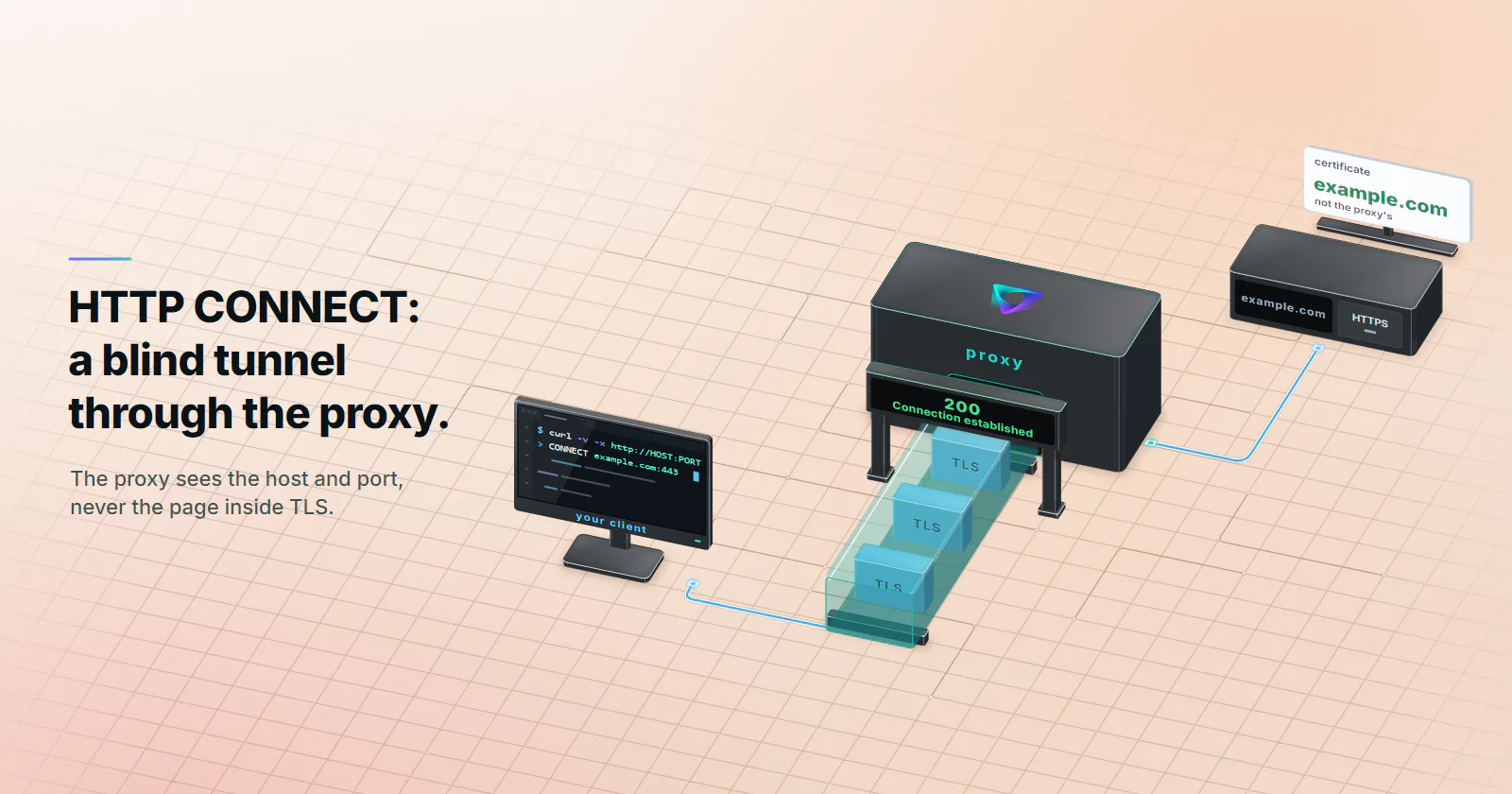
Quick summary · TL;DR
- CONNECT turns an HTTP proxy into a blind tunnel. The client names a host and port, the proxy dials it and answers 200, and from then on it relays bytes in both directions.
- HTTPS stays end to end inside the tunnel. The client runs TLS with the target through the proxy, so the proxy sees the host, port, timing and byte counts, never paths, headers or page content.
- The status of the CONNECT reply says which hop broke. A 407, 403 or 502 means the tunnel never opened; a 200 followed by a TLS error is a problem between the client and the site.
- HTTP/3 needs CONNECT-UDP. A classic CONNECT tunnel carries TCP only, so clients behind it fall back to HTTP/2 or HTTP/1.1.
The HTTP CONNECT method asks a proxy to open a TCP connection to one host and port, then step aside. The client sends CONNECT example.com:443 HTTP/1.1, the proxy dials the target, answers 200 Connection established, and then relays bytes both ways. The client’s TLS session runs through that tunnel to the site, so the proxy carries HTTPS it cannot read.
That one exchange is why HTTPS works through a proxy at all, and it is also where most proxy failures show up. A 407 or 502 to the CONNECT means the tunnel never opened, so no TLS setting on the client will fix it. A 200 followed by a TLS error is a different fault on a different hop.
Reading the CONNECT exchange in a curl trace tells the two apart in seconds, and it also shows exactly what the proxy can see.
What the HTTP CONNECT method does
RFC 9110 (June 2022), section 9.3.6, defines CONNECT as a request for the recipient to establish a tunnel to the destination named in the request target and, if that works, to restrict itself to blind forwarding of data in both directions until the tunnel closes. Any 2xx reply means the proxy has switched to tunnel mode right after its response headers.
Transport, no encryption. CONNECT moves bytes. An HTTPS page stays private because of the TLS session the client runs inside the tunnel, end to end with the site.
Any TCP protocol. The proxy does not care what flows after the 200. HTTPS is the common case, but an SSH or IMAP client can use the same HTTP tunnel if the proxy allows that port.
Hop-by-hop. CONNECT talks to the proxy the client is connected to. In a proxy chain, each proxy that forwards the CONNECT to the next one adds a hop, and credentials in Proxy-Authorization are consumed by the first proxy that asked for them.
One kind of HTTP tunnel among several. “HTTP tunnel” also names tools that wrap another protocol inside ordinary GET and POST requests to cross firewalls that only pass web traffic. CONNECT is the standardised form, and the one every proxy client speaks.
CONNECT request and response syntax
What makes the HTTP CONNECT method unique is its request target. Every other method sends a path (GET /page) or a full URL (GET http://example.com/page). CONNECT sends only a host and a port, separated by a colon, which RFC 9110 calls the authority form:
CONNECT example.com:443 HTTP/1.1
Host: example.com:443
Proxy-Authorization: Basic BASE64_OF_USERNAME:PASSWORD
No body follows the headers. Proxy-Authorization holds the proxy login, encoded in base64, which is an encoding and not encryption. A proxy that wants credentials and did not get them answers 407 Proxy Authentication Required with a Proxy-Authenticate header naming the scheme it expects.
A successful reply is shorter still:
HTTP/1.1 200 Connection established“Connection established” is only the reason phrase. Clients act on the status code, and RFC 9110 forbids Content-Length and Transfer-Encoding headers on a 2xx reply to CONNECT, because no response body follows. Whatever the client sends next is the first byte of its TLS handshake with the target.
How HTTPS works through a proxy
A verbose curl run through an HTTP proxy shows how HTTPS works through a proxy better than any diagram. This trace is trimmed, with placeholders for the proxy details; exact wording varies by curl version.
* Connected to HOST (PROXY_IP) port PORT                    [1]
* Establish HTTP proxy tunnel to example.com:443           [2]
> CONNECT example.com:443 HTTP/1.1                          [3]
> Host: example.com:443
> Proxy-Authorization: Basic BASE64_CREDENTIALS
> Proxy-Connection: Keep-Alive
>
< HTTP/1.1 200 Connection established                       [4]
<
* CONNECT phase completed                                   [5]
* TLSv1.3 (OUT), TLS handshake, Client hello (1):           [6]
* Server certificate:
*  subject: CN=example.com                                  [7]
* SSL certificate verify ok.
> GET / HTTP/2                                              [8]
> Host: example.com
Read it in order:
- TCP to the proxy. curl connects to the proxy host and port. Nothing has reached the target yet.
- curl decides to tunnel. The URL is
https://, so curl uses CONNECT. For anhttp://URL it would send the request to the proxy directly instead (next section). - The CONNECT request. Host and port in the request line, credentials in
Proxy-Authorization. This is the only part of the exchange addressed to the proxy itself. - The CONNECT 200 Connection established reply. The proxy has opened its own TCP connection to
example.com:443. Every status other than 2xx stops the run here. - Tunnel mode. From here on, the proxy relays bytes.
- TLS starts inside the tunnel. The ClientHello goes to the target. It usually carries the hostname in clear text as Server Name Indication (SNI).
- Certificate check against the target. The certificate belongs to
example.com, not the proxy. If a middlebox presents its own certificate here, the check fails, which is the point of the check. - The real request, encrypted. Method, path, headers and cookies travel inside TLS. HTTP/2 negotiated inside the tunnel works normally.
So the dividing line sits between lines 4 and 6. A failure before the 200 belongs to the proxy: credentials, policy, its connection to the target. A failure after it usually sits with the client or the site. The exception is a reset or EOF right after the 200: the 200 proves the tunnel opened, not that the relay stayed up, so a dropped exit or upstream connection on the proxy side ends that way too.
CONNECT vs GET through a proxy
An HTTP proxy handles two kinds of request, and clients pick one by the scheme of the target URL.
For an http:// target, curl, Python requests and browsers send the whole URL to the proxy: GET http://example.com/page HTTP/1.1. This is forwarding. The proxy reads the method, URL, headers and body, can rewrite or cache them, and RFC 9110 expects a forwarding proxy to add a Via header. Nothing is hidden from it.
For an https:// target, the same clients send CONNECT and tunnel. The proxy sees a host and a port, then ciphertext.
curl’s --proxytunnel flag (-p) forces CONNECT for http:// targets as well; the curl manual (checked October 2026) documents it. Some gateways only tunnel. proxymint’s own Lab measured that on its residential and mobile gateway: every plain http:// target got a 301 redirect to its https:// address, so in practice every page request through that gateway runs over CONNECT (proxymint Lab #1, measured 2026-09-28, one package per tier, US exits).
What can the proxy see?
Proxy tunneling hides content and leaves the metadata in view: that a connection happened, where it went and how big it was. Three parties sit on the path of a CONNECT request: the local network between the client and the proxy, the proxy, and the target.
Encrypted Client Hello does not hide the host on a proxy path. RFC 9849 (March 2026) encrypts the SNI inside the TLS handshake, but on an http:// proxy path the host is already in the plain-text CONNECT line, which both the proxy and the local network read. Browsers also usually skip ECH through a proxy: Chromium applies ECH keys only to direct connections, per a comment in its SSL connect job.
Plain HTTP is the exception. An http:// request is forwarded, not tunnelled, so the proxy and the local network read all of it. Nothing in a CONNECT setup protects a site that does not use TLS.
Certificate checks carry the protection. Turning them off (curl -k, verify=False in Python requests) lets anything in the middle present its own certificate and read the traffic. A legitimate commercial proxy never needs that switch.
There is one more thing the target can see: headers a proxy adds. Over CONNECT a proxy has no way to add Via or X-Forwarded-For to an encrypted request, and the Lab run above found no Via or Forwarded header at the target on both tiers it tested. Headers the client’s own code sets still travel unchanged. For how sites detect proxies from the signals that remain (IP reputation, ASN, TLS fingerprint), see how websites detect proxies.
HTTPS is not a proxy protocol
Provider docs and client settings often put HTTPS next to HTTP and SOCKS5 as if it were a third proxy type. It is a scheme option on top of two protocols.
An https:// target through an http:// proxy uses the HTTP CONNECT method, the tunnel described above. The client-to-proxy hop is plain HTTP for the CONNECT line, and the site’s own TLS runs inside it. This is what nearly every scraper, browser and SDK does.
An https:// proxy URL is something else: TLS from the client to the proxy itself, with the CONNECT line and credentials then sent inside that first TLS session. The site’s TLS still runs inside the tunnel, so traffic to an HTTPS site is encrypted twice on the first hop.
SOCKS5 reaches the same result with its own CONNECT command, defined in RFC 1928 (March 1996): the client names a host and port in a binary handshake, the proxy connects, and the stream is relayed. proxymint includes HTTP and SOCKS5 on every tier, and an http:// proxy URL carries HTTPS sites end to end through CONNECT, so most jobs need nothing else. SOCKS5 vs HTTP proxy compares the two protocols, and the types of proxies guide covers how the categories differ beyond the protocol.
Why do CONNECT tunnels fail?
Read the status of the CONNECT reply before changing anything else. With the HTTP CONNECT method, that one status line says which hop broke.
Each client words the same failure its own way. curl prints CONNECT tunnel failed, response 407 and exits with code 56 (7 from curl 8.20.0), Python requests raises ProxyError with Tunnel connection failed: 407 Proxy Authentication Required, and Chrome shows ERR_TUNNEL_CONNECTION_FAILED. The status code in the message is the part to read.
Two patterns sit behind many “works in curl, fails in my code” reports. A client that takes credentials only from a request header, set after the tunnel is open, sends them inside TLS to the target instead of on the CONNECT, so the proxy answers 407. And a proxies setting with only an http entry leaves https:// requests going direct or failing, depending on the client.
Port restrictions and security
RFC 9110 tells proxies that support CONNECT to restrict it to a limited set of known ports or a configured list of safe targets. Abuse is the reason: an open CONNECT proxy that dials any port is a relay for mail spam on port 25, for attacks on internal services, and for anything else that wants a borrowed IP. Many proxies therefore allow 443 and refuse or limit the rest, which is the 403 in the table above.
So a non-HTTPS protocol over an HTTP tunnel, such as SSH on port 22, works only where the proxy allows that port; test it before building on it. CONNECT itself is no security layer either. Protection comes from TLS inside the tunnel and from the client checking the target’s certificate.
CONNECT in HTTP/2 and HTTP/3
The HTTP CONNECT method kept its job in the newer HTTP versions, with one change in shape.
HTTP/2 CONNECT. RFC 9113 (June 2022), section 8.5, maps CONNECT onto a single stream: the request carries :method CONNECT and :authority with no :scheme or :path, and the tunnel’s bytes travel in DATA frames on that stream. One connection to the proxy can carry many tunnels at once. HTTP/3 (RFC 9114) does the same on QUIC streams.
Extended CONNECT. RFC 8441 (September 2018) added a :protocol pseudo-header so CONNECT can open something other than a raw TCP tunnel. Its first use was WebSockets over HTTP/2.
CONNECT-UDP and CONNECT-IP. The IETF MASQUE work built on extended CONNECT. RFC 9298 (August 2022) proxies UDP, which is what HTTP/3 needs, and RFC 9484 (October 2023) proxies whole IP packets. Apple’s iCloud Private Relay is one service built on this family.
Why HTTP/3 does not pass a classic tunnel. HTTP/3 runs over QUIC, which is UDP. A classic CONNECT tunnel is TCP, so a client behind it falls back to HTTP/2 or HTTP/1.1 over TLS, and the site sees an ordinary TCP connection from the exit. Carrying QUIC needs a proxy that speaks CONNECT-UDP, which is a different product from the HTTP and SOCKS5 proxies most jobs run on, and a client that speaks it too: curl added experimental support in version 8.21.0 (June 24, 2026), per the curl changelog.
Test a CONNECT tunnel yourself
One command shows the whole exchange. Replace the placeholders with the proxy details; how to use a proxy shows where each one comes from.
# full trace: CONNECT line, the proxy's reply, then TLS to the target
curl -v -x http://USERNAME:PASSWORD@HOST:PORT https://example.com -o /dev/null

# the exit IP the target sees through the tunnel
curl -s -x http://USERNAME:PASSWORD@HOST:PORT https://ipinfo.io/ip

# force CONNECT for a plain http:// target
curl -v -p -x http://USERNAME:PASSWORD@HOST:PORT http://example.com -o /dev/null
In the first run, find the > CONNECT line and the < line right after it. A 200 there means the tunnel opened, and a later certificate or HTTP error is between the client and the site; a reset or EOF can still be the proxy relay dropping. Anything else is the row to look up in the failure table. The proxy URL scheme stays http:// in every command, including for https:// targets; that is the CONNECT tunnel doing its job.
For a Python job the same check takes a few lines of requests, setting both keys so both schemes go through the proxy:
import requests

proxy = "http://USERNAME:PASSWORD@HOST:PORT"
r = requests.get("https://ipinfo.io/ip", proxies={"http": proxy, "https": proxy}, timeout=20)
print(r.status_code, r.text)
A password with @, : or / in it must be percent-encoded inside the URL, or the client parses the wrong host and the proxy answers 407.
Picking a setup for HTTPS jobs
The HTTP CONNECT method is the default path for HTTPS through any HTTP proxy, so the decision is rarely about the method and mostly about the proxy behind it.
- The job fetches
https://pages from a script or browser: use anhttp://proxy URL. Every mainstream client tunnels through CONNECT, and DNS for the target resolves on the proxy side. - The job needs a non-HTTP protocol, or a tool that only speaks SOCKS: use SOCKS5 with remote DNS,
socks5h://in curl and Python requests. - The job fails before the 200: fix credentials, port or proxy address, using the failure table. Do not touch TLS settings.
- The job fails after the 200: the tunnel opened. Look at certificates, the target’s blocking, or the client’s TLS fingerprint. If the connection resets with no TLS alert, retry on a new exit to rule out the relay.
- The target serves different content to home users than to hosting networks: the exit IP matters more than the method. Rotating residential proxies run HTTPS the same way, through CONNECT on an
http://URL or through SOCKS5, with exits on home connections and rotation set per order.
For the wider picture of what a proxy does on each request, see what a proxy server is.
Frequently asked questions
The HTTP CONNECT method asks a proxy to open a TCP tunnel to a host and port and then relay bytes without reading them. Its main use is HTTPS through an HTTP proxy: the client runs TLS with the website inside the tunnel. It can also carry other TCP protocols, such as SSH, when the proxy allows that port.
CONNECT adds no encryption of its own. It only opens a tunnel, and the security comes from the TLS session the client runs inside it with the target site. As long as the client verifies the site's certificate, the proxy cannot read paths, headers, cookies or page content. The proxy still sees the destination host, port, timing and byte counts.
It is the proxy's success reply to a CONNECT request: the proxy has opened a TCP connection to the requested host and port and has switched to tunnel mode. Any 2xx status means the same thing, and the words after the code are only a reason phrase. The next bytes the client sends are its TLS handshake with the target.
For an http:// URL, a client sends GET with the full URL to the proxy, which reads, forwards and can change the whole request. For an https:// URL, the client sends CONNECT with only the host and port, and the proxy then relays encrypted bytes it cannot read. curl can force CONNECT for http:// targets with the --proxytunnel flag.
It sees the hostname and port, because the CONNECT request names them, and usually the hostname again in the TLS handshake. It cannot see the path, the query string, headers or content, which travel inside TLS. Encrypted Client Hello does not change this on a proxy path: the CONNECT line already names the host in plain text to the proxy and the local network, and browsers usually do not use ECH through a proxy.
Yes. After the 200 reply the proxy relays any TCP stream, so SSH, IMAP or a database protocol can run through an HTTP tunnel. In practice most proxies allow CONNECT only to port 443 or a short list of ports, because an open CONNECT proxy gets abused as a relay. A refused port usually comes back as 403.
Not through a classic one. HTTP/3 runs over QUIC, which is UDP, and a CONNECT tunnel carries TCP, so the client falls back to HTTP/2 or HTTP/1.1 inside the tunnel. Proxying QUIC needs CONNECT-UDP, defined in RFC 9298 in 2022, which uses the extended CONNECT method on HTTP/2 or HTTP/3.
Researched and drafted with AI tools, then checked against our publishing rules before it went live: 8 outside links, 7 links to other proxymint pages, no prices and a fact-check pass against our product records. How we write.