
Tunneling socket could not be established: causes and fixes
The Node error means a proxy refused or never answered a CONNECT request. Read the statusCode or cause in the message, then apply the one fix that matches it.
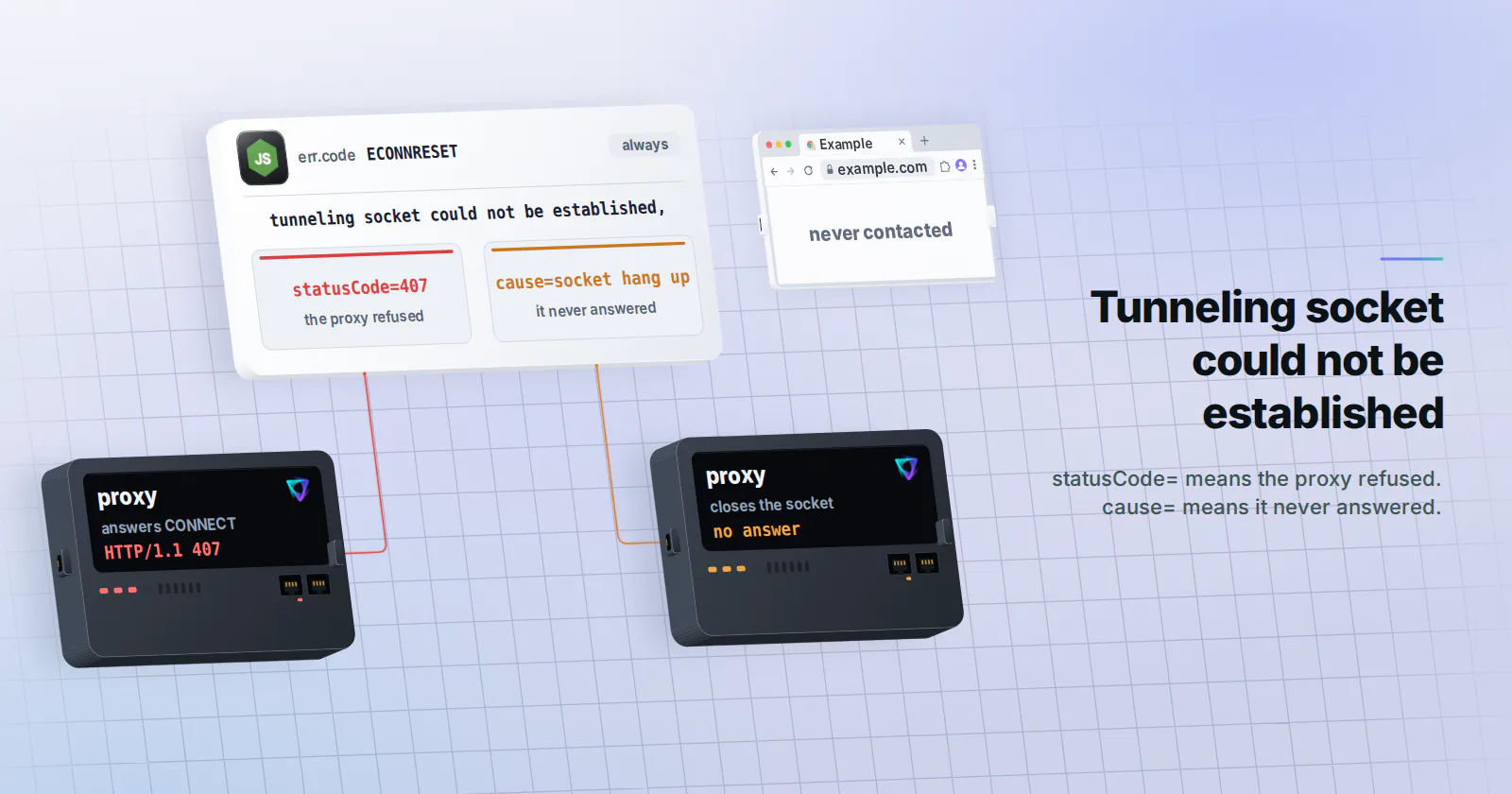
Quick summary · TL;DR
- The error comes from a Node proxy tunnel that failed. The tunnel-agent or tunnel package sent an HTTP CONNECT to a proxy for an HTTPS site and got no 200 back, so no tunnel opened and the request never left the client.
- The text after the comma is the cause. statusCode= followed by a number means the proxy answered with a refusal; cause= followed by a socket error means the CONNECT never got an answer.
- The error code is always ECONNRESET. Both libraries hard-code it for every tunnel failure, so a wrong password and a dead socket look the same to code that only checks err.code.
- An https:// proxy URL is the most common single mistake. It makes the client speak TLS to a plain HTTP proxy and fail with EPROTO; the proxy URL should start with http:// even for HTTPS sites.
“tunneling socket could not be established” is a Node.js proxy error. A client built on the tunnel-agent or tunnel package asked a proxy to open a tunnel to an HTTPS site with an HTTP CONNECT request, and the proxy either refused (the message ends in statusCode= and a number) or never answered (it ends in cause= and a socket error). No tunnel opened, so the request never reached the site.
The string turns up in npm installs behind a company proxy, GitHub Actions runners, VS Code extensions, Electron apps and old SDKs, and in scrapers still running the request library through a proxy provider. Forum threads each fix one case. The faster route is to read the text after the comma, because the library puts the cause there.
Where the tunneling socket error comes from
Two small npm packages print this exact text: tunnel-agent, which request uses, and tunnel, which @actions/http-client from the GitHub Actions toolkit still lists as a dependency (both files checked October 16, 2026). Neither package has shipped a release since 2018, and request was deprecated on February 11, 2020, with issue 3142 as the notice. They keep running inside older tools:
requestand anything built on it, including npm 6 and earlier and node-gyp before version 8 (their published dependency lists namerequest).@actions/http-client, the HTTP layer of JavaScript actions built on the GitHub Actions toolkit, which shows up on self-hosted runners behind a proxy.- VS Code extensions, Electron apps and vendor SDKs that bundled one of the two.
Both libraries do the same thing. For an https:// target they send CONNECT host:443 HTTP/1.1 to the proxy, with a Proxy-Authorization: Basic header when the proxy URL carries a username and password. A 200 opens the tunnel and TLS to the site starts inside it. Any other outcome becomes this error. RFC 9110, section 9.3.6 (June 2022) defines that exchange: a 2xx reply means the tunnel is up, anything else means it was not formed.
Read the two message shapes
The tunneling socket could not be established message comes in two forms, and they point at different problems.
statusCode=NNN. The proxy received the CONNECT and answered with a refusal. The proxy is reachable and the connection to it works; it is saying no. The number is its HTTP status.
cause=… The CONNECT never got an answer. The TCP connection to the proxy was refused, the proxy’s hostname did not resolve, TLS to the proxy failed, or the proxy closed the socket. The text after cause= is Node’s own socket error.
The code is always ECONNRESET. Both libraries set error.code = 'ECONNRESET' on every tunnel failure, hard-coded in the source. A 407 from a proxy that is up and healthy carries the same code as a dead socket. Code that branches on err.code === 'ECONNRESET' to decide whether to retry treats a wrong password as a network blip. Match on the message text instead.
A local reproduction shows the exact strings. Running request 2.88.2 on Node 22 against a 20-line fake proxy (October 16, 2026) printed:
ECONNRESET | tunneling socket could not be established, statusCode=407
ECONNRESET | tunneling socket could not be established, statusCode=502
ECONNRESET | tunneling socket could not be established, cause=socket hang up
ECONNRESET | tunneling socket could not be established, cause=connect ECONNREFUSED 127.0.0.1:9999
ECONNRESET | tunneling socket could not be established, cause=getaddrinfo ENOTFOUND no-such-proxy.invalid
ECONNRESET | tunneling socket could not be established, cause=write EPROTO ...:SSL routines:tls_get_more_records:packet length too long
Fixes by statusCode
When the message ends in a status code, the proxy answered, and its status names the fix.
| statusCode | What the proxy is saying | Change this |
|---|---|---|
| 407 | No credentials arrived, or the wrong ones | Put the username and password in the proxy URL, percent-encode special characters, check the env var the tool reads |
| 403 | Policy refused this destination or port | Corporate proxy: ask for the registry or host to be allowed. Squid’s default config denies CONNECT to any port other than 443 |
| 400 | The proxy could not parse the CONNECT | Check for a stray path or scheme in the proxy setting; a strict proxy may reject the Host header (see below) |
| 404 | Some proxies use it for a destination name that does not resolve | Check the target hostname and the proxy’s DNS |
| 405 or 501 | This endpoint does not support CONNECT | The address is a web server or a reverse proxy, not a forward proxy; use the proxy port the provider or IT gave |
| 502 | The proxy could not reach the site or its next hop | Retry later; on a rotating pool a new request gets a new exit |
| 503 | The proxy is overloaded, or its DNS lookup failed | Retry with backoff; Squid answers a failed name lookup with 503 |
| 504 | The proxy timed out reaching the site | Check the destination is up; a corporate proxy may block outbound routes |
407 in detail. statusCode=407 is the most searched form. With request, credentials go in the URL: http://USERNAME:PASSWORD@HOST:PORT. If the password contains #, /, ? or %, percent-encode it, or the URL parser splits it in the wrong place. A %41 in a password is decoded to A before it is sent. The 407 Proxy Authentication Required guide covers the per-client fixes, and the proxy string formats page shows how the same credentials look in each tool.
504 from a strict company proxy. Issue 32 on tunnel-agent, opened October 30, 2017 and still open, records a corporate proxy answering statusCode=504; the reporter traced it to tunnel-agent, used on its own, sending the proxy’s own address in the CONNECT Host header. request sets the target host itself. If curl gets through the same proxy and a direct tunnel-agent call does not, that header is the difference.
Fixes by cause
When the message ends in cause=, the CONNECT never got an answer, and the socket error names the fix.
| cause= | What happened | Change this |
|---|---|---|
| connect ECONNREFUSED | Nothing listens on that host and port | Wrong port, proxy service down, or a local proxy (Fiddler, a VPN client) that is no longer running |
| getaddrinfo ENOTFOUND or EAI_AGAIN | The proxy’s hostname does not resolve | Typo, a placeholder like proxy_host left in .npmrc, or a VPN-only hostname used off the VPN |
| connect ETIMEDOUT | No reply to the TCP connection | Firewall, wrong network, or a proxy only reachable from inside the office |
| socket hang up | The proxy accepted the connection, then closed it | A SOCKS-only port spoken to as HTTP, a proxy that drops unauthenticated clients, or an idle limit |
| Parse Error | The reply on that port was not valid HTTP | The port runs another protocol, or a middlebox rewrote the reply; check the port with curl -v |
| write EPROTO … SSL routines | The client tried TLS to a proxy that speaks plain HTTP | Change the proxy URL from https:// to http:// |
| self-signed certificate in certificate chain | A TLS-inspecting company proxy re-signed the site | Trust the company CA, as described below |
socket hang up on a SOCKS port
A SOCKS5 server expects a binary greeting starting with byte 5, not the text CONNECT. Most close the connection, and Node reports a hang up. If the provider gave a SOCKS5 port, point an HTTP-proxy client at the HTTP port instead, or use a client with SOCKS support. The SOCKS5 vs HTTP proxy comparison explains which client speaks which.
The https:// proxy scheme mistake
request picks its tunnel mode from two schemes, the target’s and the proxy’s. With https:// on the proxy URL it calls httpsOverHttps and opens TLS to the proxy before sending CONNECT. A plain HTTP proxy answers the TLS hello with text, and OpenSSL fails with EPROTO. On Node 22 the detail read packet length too long; other OpenSSL builds print wrong version number or unknown protocol for the same mistake.
Removing one character fixes it: HTTPS_PROXY=http://HOST:PORT. HTTPS still travels inside the tunnel, encrypted end to end between the client and the site, so the proxy URL does not need it.
Certificate errors and strict-ssl
Forum answers often end in npm config set strict-ssl false or rejectUnauthorized: false. That turns off certificate checks for every request, which removes the protection TLS gives against the very interception that caused the error.
Behind a company proxy, self-signed certificate in certificate chain usually means TLS inspection, where the proxy decrypts traffic and re-signs it with a company certificate authority. Trust that CA instead:
export NODE_EXTRA_CA_CERTS=/path/to/company-ca.pem
npm config set cafile /path/to/company-ca.pem
NODE_EXTRA_CA_CERTS has been in Node since 7.3.0 and adds certificates to the built-in list rather than replacing it, per the Node.js CLI docs (checked October 16, 2026). IT can supply the CA file, or it can be exported from the browser’s certificate viewer on any HTTPS site.
Where the proxy setting comes from
Often nobody remembers making the setting behind the error. request reads environment variables when no proxy is passed in code: for an https:// target it takes HTTPS_PROXY, then https_proxy, then HTTP_PROXY, then http_proxy, and skips hosts listed in NO_PROXY or no_proxy (from lib/getProxyFromURI.js in the request source). Print them all:
env | grep -i _proxy
npm config get proxy
npm config get https-proxy
npm config get noproxy
npm config ls -l | grep -iE "proxy|strict-ssl|cafile"
npm reads .npmrc files at project, user and global level, and an npm_config_https_proxy variable overrides all of them. Its config reference (checked October 16, 2026) documents proxy, https-proxy, noproxy, strict-ssl and cafile. To clear a stale value, run npm config delete https-proxy and check the .npmrc in the project folder too.
In VS Code, check the http.proxy setting and the http_proxy and https_proxy variables the editor was started with. On a self-hosted GitHub Actions runner, check the variables in the runner’s service environment and in the .env file in the runner folder. In Docker builds, the variables have to reach the build, either through --build-arg or the Docker client config, or the build runs without them while the host works fine. The how to use a proxy guide covers the system-level settings on each operating system.
Read the proxy’s reply with curl
One command shows what the proxy says, outside Node:
curl -v -x "http://USERNAME:PASSWORD@HOST:PORT" https://registry.npmjs.org/ -o /dev/nullLook for the line after > CONNECT registry.npmjs.org:443. < HTTP/1.1 200 means the proxy is fine and the problem is in the Node tool’s settings. < HTTP/1.1 407 with a Proxy-Authenticate: Basic header means credentials. NTLM or Negotiate in that header means a Windows-domain company proxy that request cannot answer at all; a local bridge such as px or cntlm on 127.0.0.1, or a build-server exception from IT, is the usual route.
If curl gets 200 and the Node tool still fails, compare the two proxy strings character by character. The usual difference is the scheme, an unencoded password or a variable curl reads and the tool does not.
Hangs, timeouts and retries
A proxy that accepts the TCP connection and then never answers the CONNECT can hang a request call indefinitely. The library starts its timeout timer when the request gets a socket, and with a tunnel that only happens after the CONNECT succeeds. In the same local run, a call with timeout: 3000 against a stalled fake proxy was still waiting after 60 seconds. Wrap the call in an outer timer:
const req = request({ url, proxy, timeout: 10000 }, callback);
const guard = setTimeout(() => req.abort(), 15000);
req.on('complete', () => clearTimeout(guard));
req.on('error', () => clearTimeout(guard));
Retry only what can change. statusCode=502, 503 and 504, ETIMEDOUT and an occasional hang up can succeed on a second try, especially on a rotating pool where a new request gets a new exit IP. statusCode=407, 403, 405, ENOTFOUND and EPROTO return the same answer every time; a retry loop only delays the alert.
Move off request
request will not get a fix, and modern clients print clearer errors for the same failures. The same fake proxy, run through each client on Node 22 (October 16, 2026), printed:
| Client | 407 from the proxy | Proxy closed the socket |
|---|---|---|
| request 2.88.2 | tunneling socket could not be established, statusCode=407 | ... cause=socket hang up |
| https-proxy-agent 7.0.6 | No error; the response object carries status 407 | Proxy connection ended before receiving CONNECT response |
| undici 6.21.3 ProxyAgent with fetch | fetch failed, cause Proxy response (407) !== 200 when HTTP Tunneling | No error within 40 seconds; pass signal: AbortSignal.timeout(15000) |
Node https with NODE_USE_ENV_PROXY=1 | ERR_PROXY_TUNNEL: Failed to establish tunnel to example.com:443 via http://HOST:PORT: HTTP/1.1 407 | Not tested |
Node can now read the proxy variables without any package. NODE_USE_ENV_PROXY=1 was added in Node 24.0.0 and 22.21.0, and the --use-env-proxy flag in 24.5.0 and 22.21.0, per the Node.js CLI docs; both are marked active development. For a scraper, undici’s ProxyAgent with fetch is the shortest path:
import { ProxyAgent, fetch } from 'undici';

const dispatcher = new ProxyAgent('http://USERNAME:PASSWORD@HOST:PORT');
const res = await fetch('https://example.com/', { dispatcher });
console.log(res.status);
Next step after a tunneling socket error
Read the text after the comma, then act on it:
- statusCode=407: credentials. Check the env var the tool reads, encode the password, test with curl.
- statusCode=403, 400 or 405: policy or the wrong endpoint. Ask IT, or use the forward-proxy port.
- statusCode=502, 503 or 504: behind the proxy. Retry with backoff; check the target is up.
- cause=EPROTO: change
https://tohttp://in the proxy URL. - cause=ECONNREFUSED, ENOTFOUND or ETIMEDOUT: the proxy address itself. Fix the host and port, or remove a stale setting.
- self-signed certificate: add the company CA with
NODE_EXTRA_CA_CERTSor npmcafile; leavestrict-sslon.
For a scraping or monitoring job that runs through a provider, the proxy URL is plain http:// with a username and password, and rotating residential proxies rotate the exit IP on every request, on a 5 to 60 minute timer, or keep it sticky while the device stays online, which is what makes a retry on a 502 worth doing. On proxymint, every tier includes both HTTP and SOCKS5, and authentication is username and password.
Frequently asked questions
It means a Node.js client built on the tunnel-agent or tunnel package asked a proxy to open a tunnel to an HTTPS site and did not get a 200 reply. If the message ends in statusCode= the proxy refused; if it ends in cause= the proxy never answered. No tunnel opened and the request never reached the site, so the fix is in the proxy or the proxy setting.
A 407 means the proxy received no credentials or the wrong ones. Put them in the proxy URL as http://USERNAME:PASSWORD@HOST:PORT, percent-encode special characters in the password, and check which environment variable or npm setting the tool actually reads. Test the same URL with curl -v to confirm the proxy accepts it.
Both tunnel-agent and tunnel set the error code to ECONNRESET for every tunnel failure, whatever the cause. The real reason is in the message text after the comma. Code that decides whether to retry should read that text, not the code.
Run npm config get proxy and npm config get https-proxy, and set both to the company proxy with an http:// scheme. If the proxy answers 403, ask IT to allow the registry; if npm then reports a self-signed certificate, add the company CA with npm config set cafile. npm 6 and earlier print the tunneling message; current npm prints different text for the same problems.
With an ordinary forward proxy it starts with http://. The scheme describes the connection to the proxy, and HTTPS sites travel encrypted inside the CONNECT tunnel anyway. An https:// proxy URL makes the client attempt TLS to the proxy, which fails with an EPROTO error when the proxy speaks plain HTTP.
No. It turns off certificate checks for every request, which removes the protection against interception. When the error is a self-signed certificate from a company proxy that inspects TLS, add that company's CA with NODE_EXTRA_CA_CERTS or npm cafile and keep strict-ssl on.
The proxy accepted the TCP connection and then closed it without answering the CONNECT. Common reasons are an HTTP client pointed at a SOCKS-only port, a proxy that drops unauthenticated clients, or an idle limit on the proxy. Check the port type and credentials, then test with curl -v.
Researched and drafted with AI tools, then checked against our publishing rules before it went live: 7 outside links, 5 links to other proxymint pages, no prices and a fact-check pass against our product records. How we write.