
n8n proxy setup: HTTP Request node, env vars and SOCKS5
n8n proxy setup for the HTTP Request node and the whole instance: the Proxy option, HTTPS_PROXY and NO_PROXY, why SOCKS5 falls back, rotation per item, 407s.
Quick summary · TL;DR
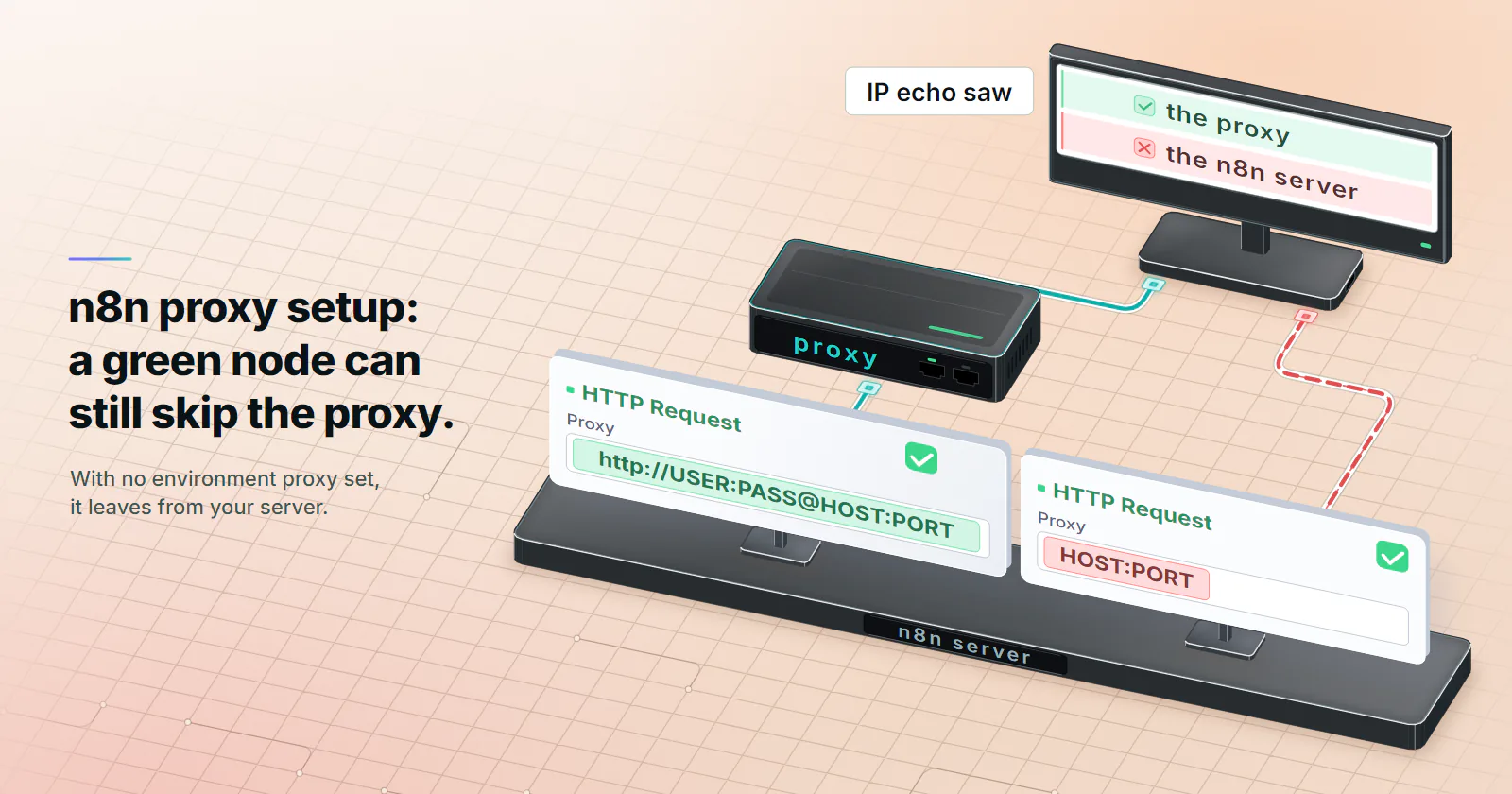
- Put the full http:// URL in the Proxy field. Under Options > Proxy on the HTTP Request node, write http://USERNAME:PASSWORD@HOST:PORT. Paste a socks5:// URL or a bare HOST:PORT and n8n drops it and falls back to environment proxy settings. With no applicable environment proxy configured, the request leaves from your server and the node can still go green, which is the failure that eats an afternoon.
- For the whole self-hosted instance, set HTTP_PROXY and HTTPS_PROXY as a pair. Each one covers only targets of its own scheme, so with just HTTPS_PROXY your http:// calls go direct. NO_PROXY lists hosts that skip the proxy, and a lowercase https_proxy left in the container wins over yours.
- Forget SOCKS5 on n8n 2.44.6. As an env var it fails with "Proxy connection ended before receiving CONNECT response". Use your provider's HTTP endpoint instead; over CONNECT the hostname still resolves on the proxy side, so you lose nothing on DNS.
- Rotation comes from the gateway or from an expression. n8n opens one tunnel per request and fires every item at once, so a per-request gateway hands each item its own exit, and {{ $json.proxy }} walks a list item by item.
An n8n proxy goes in one of two places. For one HTTP Request node, open Options, add Proxy and enter http://USERNAME:PASSWORD@HOST:PORT. For every node on a self-hosted instance, set HTTPS_PROXY and HTTP_PROXY (or ALL_PROXY) on the n8n process. When both exist, the node’s Proxy option wins, and only http:// and https:// proxy URLs are accepted.
That last rule is the one that bites. Paste socks5://..., or the HOST:PORT line a proxy dashboard exports, into the Proxy field and n8n drops it. Your server log gets one line at most, and n8n falls back to environment proxy settings. With no applicable environment proxy configured, the request goes direct and the node can still turn green. You only notice when someone checks which IP the target saw.
These results were tested on n8n 2.44.6 with the HTTP Request node at version 4.5, the default in that release, against a local logging HTTP proxy, a SOCKS5 proxy with a login and an IP echo target. The code paths were traced to the @n8n/backend-network source at tag n8n@2.44.6 (checked October 23, 2026). Here, an n8n proxy means the outbound proxy for workflow traffic. A reverse proxy in front of the n8n editor is a different job, configured with N8N_PROXY_HOPS.
n8n proxy setup in one answer
Per node. In the HTTP Request node, go to Options > Add option > Proxy and paste the full URL with the scheme: http://USERNAME:PASSWORD@HOST:PORT. The field accepts an expression, so {{ $json.proxy }} works when an earlier node supplies the URL. This is the only route on n8n Cloud, where you do not start the n8n process yourself.
Whole instance. The deployment environment variables page (n8n docs, checked October 23, 2026) lists HTTP_PROXY, HTTPS_PROXY, ALL_PROXY and NO_PROXY. Set them where n8n starts. With Docker:
docker run -it --rm --name n8n -p 5678:5678 \
  -e HTTPS_PROXY="http://USERNAME:PASSWORD@HOST:PORT" \
  -e HTTP_PROXY="http://USERNAME:PASSWORD@HOST:PORT" \
  -e NO_PROXY="localhost,127.0.0.1,internal-api" \
  -v n8n_data:/home/node/.n8n \
  n8nio/n8n
Or in Docker Compose:
services:
  n8n:
    image: n8nio/n8n
    ports:
      - "5678:5678"
    environment:
      - HTTPS_PROXY=http://USERNAME:PASSWORD@HOST:PORT
      - HTTP_PROXY=http://USERNAME:PASSWORD@HOST:PORT
      - NO_PROXY=localhost,127.0.0.1,internal-api
    volumes:
      - n8n_data:/home/node/.n8n
volumes:
  n8n_data:
Credentials. The username and password go inside the URL. Percent-encode @, : and / in a password (@ becomes %40). In the lab an unencoded password containing @ and : still parsed, but the encoded form is the one that never surprises you. Our proxy string formats guide converts the host:port:user:pass lines most dashboards export.
One thing to know before you share workflows: the Proxy option is a plain string parameter in the node’s description, not a credential. The password sits in the workflow JSON in clear text and goes with every export, template or copied node. If other people open or download your workflows, keep the URL in HTTPS_PROXY and HTTP_PROXY, where no workflow ever sees it.
The HTTP Request node Proxy option
n8n’s HTTP Request node docs describe the option in two sentences: an HTTP proxy, which takes precedence over the environment variables. Read the source and there is more to it. isSupportedProxyUrl in node-agents.ts accepts a value only if it starts with http:// or https://. A value that parses as a URL but has another scheme goes to resolveProxyOption, which logs Ignoring unsupported proxy URL "...", falling back to environment proxy settings and uses the environment variables instead. A value that does not parse at all is dropped one step earlier, in getUrlFromProxyConfig, with no log line. Either way, with no variables set, that means no proxy.
Here is what the target saw for each value in the lab, with no proxy variables set on the process:
| Value in the Proxy field | What n8n did | Exit the target saw |
|---|---|---|
http://USERNAME:PASSWORD@HOST:PORT | CONNECT with the login for https:// targets, an absolute-URL request for http:// targets | The proxy |
socks5://USERNAME:PASSWORD@HOST:PORT | Logged “Ignoring unsupported proxy URL”, sent the request without a proxy | The n8n server |
USERNAME:PASSWORD@HOST:PORT | Same log line, no proxy; no log line if the username has an _ or starts with a digit | The n8n server |
HOSTNAME:PORT, such as localhost:8080 | Same log line, no proxy | The n8n server |
IP:PORT, such as 203.0.113.5:8080 | No log line at all, no proxy | The n8n server |
http://USERNAME:WRONG@HOST:PORT | Proxy answered 407, node error 407 - "" | Nothing |
https://USERNAME:PASSWORD@HOST:PORT on a plain proxy | TLS to a port that does not speak it, write EPROTO ... wrong version number | Nothing |
Watch the IP:PORT row, it is the nasty one. A string like 203.0.113.5:8080 does not parse as a URL, so it never reaches the warning, and nothing in the execution or the log says the proxy was skipped. A bare login line can do the same: n8n reads everything before the first colon as a URL scheme, so a username like user_1 fails to parse and is dropped just as quietly. Add http:// and the login, and the same field works.
Environment variables for every node
For an n8n proxy on the whole instance, n8n reads the variables through the proxy-from-env package, which picks the variable by the target’s scheme, not by the proxy’s. So the variable you set decides which targets get proxied, as the lab showed:
| Variables on the n8n process | https:// target | http:// target |
|---|---|---|
HTTPS_PROXY only | Proxy | Direct |
HTTP_PROXY only | Direct | Proxy |
ALL_PROXY only | Proxy | Proxy |
HTTPS_PROXY plus NO_PROXY naming the target host | Direct | Direct |
HTTPS_PROXY and lowercase https_proxy, different ports | The lowercase one | Direct |
| Any of the above plus a valid node Proxy option | The node’s proxy | The node’s proxy |
Set both HTTP_PROXY and HTTPS_PROXY, or ALL_PROXY. With only HTTPS_PROXY, an old http:// endpoint or a health check quietly leaves from the server, which is the kind of gap that shows up weeks later in a target’s logs.
NO_PROXY. Comma-separated hostnames that skip the proxy. Put the HTTP services your workflows call on the same network there, such as an internal API or a model server. Otherwise a workflow that calls them pays proxy traffic for a hop that never needed it, or fails because the proxy cannot reach a private address.
Lowercase wins. The n8n docs note it and the lab confirmed it: with HTTPS_PROXY on one port and https_proxy on another, every https:// request used the lowercase one. A base image that sets https_proxy for its own build can override what you put in your compose file, so check env inside the container.
Scope. The docs describe these variables as applying to traffic from nodes. The tests here used the HTTP Request node; for any other node that matters, run the IP echo check at the end of this guide through it.
SOCKS5 in n8n
There is no working SOCKS5 path in n8n 2.44.6, in either place. The proxy agents n8n builds, http-proxy-agent and https-proxy-agent in proxied-agents.ts, speak HTTP to the proxy whatever the URL’s scheme says.
- In the node’s Proxy field, a
socks5://URL is ignored and n8n falls back to environment settings. The request goes direct only when no applicable environment proxy is configured, as in the lab table above. HTTPS_PROXY=socks5://USERNAME:PASSWORD@HOST:PORTsends an HTTP CONNECT to the SOCKS port, and the node fails withProxy connection ended before receiving CONNECT response.ALL_PROXY=socks5h://...fails the same way on https:// targets and withParse Error: Expected HTTP/, RTSP/ or ICE/on http:// targets.
n8n community threads report the same thing on older releases: a feature request for SOCKS5 in the node, and https:// requests failing behind ALL_PROXY=socks5h:// in Docker. Use the provider’s HTTP endpoint. proxymint includes HTTP and SOCKS5 on every tier, so the fix is to paste the HTTP endpoint from the same order. If a provider offers SOCKS5 only, run a local HTTP-to-SOCKS forwarder next to n8n and point the variables at it.
Switching to HTTP costs nothing on DNS. With an http:// proxy and an https:// target, the client sends CONNECT host:443 and the proxy resolves the name, the property people usually reach for socks5h:// to get. proxymint Lab #1 measured that CONNECT requests through the per-GB gateway resolve on the proxy side. SOCKS5 vs HTTP proxy compares the two protocols in more depth, and the DNS leak test shows how to check your own client.
n8n proxy authentication and 407
Credentials belong in the proxy URL. Some setup guides suggest leaving them out and adding a Proxy-Authorization header through Send Headers or a Header Auth credential instead. In the lab that worked for an http:// target and failed with 407 for every https:// target.
Blame the tunnel. For an https:// URL, n8n first sends CONNECT host:443 to the proxy, and the proxy wants the login on that CONNECT. Headers you add to the node travel inside the encrypted tunnel to the target, after the CONNECT, so the proxy never sees them. Most APIs and sites are https://, so the header route fails exactly where you need it.
A wrong password shows up in the node as 407 - "" on https:// targets and 407 - "..." with the proxy’s body on http:// targets. n8n does not retry it unless Retry On Fail is on in the node settings. If the same URL works in curl from the n8n host and fails in the node, compare the encoding of special characters first. Our 407 Proxy Authentication Required guide lists the causes on the proxy side, including a package that has run out.
Rotating proxies in n8n
n8n has no rotation setting of its own, so the IP changes either at the gateway or in the workflow.
Rotation at the gateway. Point every request at one rotating endpoint and let the provider change the exit. On proxymint per-GB orders the rotation mode lives on the order: a new IP on every request, a timer from 5 to 60 minutes, or sticky while the device stays online, and it can be changed later without new credentials. Your node configuration stays one URL.
Rotation per item. When you hold a list of separate proxy URLs, let a Code node attach one to each item and read it with an expression in the Proxy field:
// Code node, mode "Run Once for All Items"
const proxies = [
  'http://USERNAME:PASSWORD@HOST_1:PORT_1',
  'http://USERNAME:PASSWORD@HOST_2:PORT_2',
  'http://USERNAME:PASSWORD@HOST_3:PORT_3',
];

return $input.all().map((item, i) => ({
  json: { ...item.json, proxy: proxies[i % proxies.length] },
}));
Then set the HTTP Request node’s Proxy option to {{ $json.proxy }}. In the lab, six items over three URLs left through exits 1, 2, 3, 1, 2, 3, in item order.
How n8n opens connections. Each request opened its own CONNECT tunnel, with a Connection: close header, so one item never reuses another item’s connection. Without batching, all items of a run go out at once: six items opened six tunnels within the same millisecond. On a gateway set to a new IP per request, that is six exits in one burst. The node’s Batching option paces it; with a batch size of 1 and a 1,000 ms interval, the six CONNECTs arrived one second apart.
Multi-step flows. A workflow that logs in with one HTTP Request node and fetches with the next needs both calls on the same exit, or the session cookie arrives from a different IP. Per-item rotation breaks that, and so does per-request rotation at the gateway. Use sticky mode, or a timer longer than the run, on a per-GB order. Rotating vs sticky proxies covers what breaks under each mode.
Redirects. The HTTP Request node follows redirects by default. In the lab, an http:// URL that answered 301 to an https:// address was followed through the same proxy, with a new CONNECT for the second hop.
n8n proxy errors and what they mean
| Message | Where | What it means | Fix |
|---|---|---|---|
Ignoring unsupported proxy URL "..." | n8n server log | The Proxy value has no http:// or https:// scheme, or is SOCKS | Use http://USERNAME:PASSWORD@HOST:PORT |
407 - "" | Node error | The proxy refused the login | Check the username and password, percent-encode special characters |
connect ECONNREFUSED HOST:PORT | Node error | Nothing listens on that host and port | Check the port and protocol from the order |
write EPROTO ... wrong version number | Node error | An https:// proxy URL pointed at a plain HTTP proxy port | Use http:// for the proxy URL |
Proxy connection ended before receiving CONNECT response | Node error | A SOCKS5 URL in HTTPS_PROXY or ALL_PROXY | Use the provider’s HTTP endpoint |
Parse Error: Expected HTTP/, RTSP/ or ICE/ | Node error | A SOCKS5 URL in ALL_PROXY or HTTP_PROXY, http:// target | Same |
400 The plain HTTP request was sent to HTTPS port | Node error, an nginx error page | Plain HTTP reached a port that expects TLS. A URL written http:// with port 443 does it: through a proxy, n8n 2.44.6 sent that as a plain GET, with no CONNECT | Write https:// in the URL, and check the proxy URL points at the proxy’s plain HTTP port |
| Green result, server’s own IP | Nothing | Scheme missing in the Proxy field, a target in NO_PROXY, or only one of HTTP_PROXY and HTTPS_PROXY set | Run the exit check below |
Verify the exit and pick the type
Nothing in the node tells you which proxy it used, so ask the target. An empty or omitted Proxy option is not a direct baseline: n8n uses environment proxy settings. Two nodes can return the same proxy exit IP when one explicitly names the proxy and the other inherits it.
First obtain a direct egress baseline from the same n8n host and network namespace. For Docker, run this inside the n8n container if curl is available, or in a diagnostic container sharing its network namespace, not from your laptop or the Docker host:
curl --noproxy '*' --fail --silent --show-error \
  'https://api.ipify.org?format=json'
--noproxy '*' explicitly disables curl’s configured proxies for all hosts, even if HTTP_PROXY, HTTPS_PROXY, ALL_PROXY or their lowercase variants are present. Plain curl can inherit those variables and is not a direct control. This disables application-level proxies, not a transparent network proxy or VPN; if the network enforces one, document that limitation rather than claim a proxy-free route. A failed direct request gives no usable baseline. An alternative is a separately controlled n8n process in the same network namespace with all relevant proxy variables cleared, including lowercase and npm_config_* variants, and no node Proxy option.
Then run an HTTP Request node against the same echo URL with the configuration you are testing: a full Proxy URL for a node-only setup, or an empty Proxy option for an environment-proxy setup. Compare its ip with the known direct baseline. A different IP is evidence of different egress, not identification of a specific proxy. Matching IPs are a signal to investigate, not proof that n8n bypassed the proxy: a proxy can share the direct route’s public IP. Check the effective environment (including lowercase variables and NO_PROXY), the node URL and proxy access logs for the test request before deciding which route was used. Use an https:// echo URL: through the proxymint per-GB gateway, plain http:// requests get a 301 to the https:// address (Lab #1). The node follows it, but a check that does not follow redirects reads the 301 as a failure.
User-Agent. An n8n proxy changes the IP, not the headers. Every request in the lab arrived with User-Agent: n8n, which a site’s bot rules can match without looking at the IP at all. Set your own User-Agent header on the node, or start n8n with N8N_ENFORCE_GLOBAL_USER_AGENT=true to send Mozilla/5.0 (compatible; n8n/<version>; +https://n8n.io/) on all outbound requests, or set N8N_GLOBAL_USER_AGENT_VALUE to a string of your own, as the deployment variables page describes.
Pick the type by the target. Public data from consumer-facing sites, prices and stock across markets, and search results by location fit rotating residential proxies, with country, region and city chosen on the order. Partner APIs and endpoints that accept hosting networks fit datacenter, built for speed and volume. A workflow that logs into one account and must keep one address for days fits static ISP proxies. Every tier authenticates with a username and password in the same URL format shown above, so moving a workflow between them is one field.
If the job is a scheduled n8n proxy workflow that reads public pages from consumer sites, start with residential on an http:// URL, check the exit once, and set the rotation mode on the order to match the flow: every request for independent items, sticky for anything that logs in.
Frequently asked questions
On one HTTP Request node, open Options, add Proxy and enter http://USERNAME:PASSWORD@HOST:PORT. For every node on a self-hosted instance, set HTTP_PROXY and HTTPS_PROXY, or ALL_PROXY, in the environment that starts n8n. If both are set, the node's Proxy option wins.
Add the Proxy option under Options and paste the full URL including http:// and the credentials. The field accepts an expression such as {{ $json.proxy }}, so an earlier node can supply a different URL per item. In n8n 2.44.6 only values starting with http:// or https:// are used; anything else is ignored.
Not in n8n 2.44.6. A socks5:// URL in the node's Proxy field is ignored with a log line and n8n falls back to environment settings (direct only when no applicable environment proxy is configured), and a SOCKS5 URL in HTTPS_PROXY or ALL_PROXY makes requests fail because n8n speaks HTTP to the proxy. Use the provider's HTTP endpoint, or a local HTTP-to-SOCKS forwarder if SOCKS5 is all you have.
Pass them as environment variables when the container starts, for example -e HTTPS_PROXY=http://USERNAME:PASSWORD@HOST:PORT and -e HTTP_PROXY with the same URL in docker run, or under environment in Docker Compose. Add NO_PROXY for internal services your workflows call over HTTP. Check the container's env for lowercase versions, which take precedence.
Either point the node at a rotating gateway that changes the IP per request or on a timer, or attach a proxy URL to each item in a Code node and set the Proxy option to {{ $json.proxy }}. n8n opens a new tunnel for every request, so a per-request gateway gives each item its own exit. Use the Batching option to pace the requests.
The most common cause is a Proxy value without http:// in front, such as HOST:PORT or USERNAME:PASSWORD@HOST:PORT, or a socks5:// URL. n8n skips it and falls back to the environment variables, or to no proxy. Other causes are a target listed in NO_PROXY, or only HTTPS_PROXY being set while the URL is http://.
Put them in the proxy URL: http://USERNAME:PASSWORD@HOST:PORT, with special characters in the password percent-encoded, for example @ as %40. Adding a Proxy-Authorization header to the node does not work for https:// targets, because that header is sent inside the tunnel after the proxy has already asked for the login.
Researched and drafted with AI tools, then checked against our publishing rules before it went live: 8 outside links, 9 links to other proxymint pages, no prices and a fact-check pass against our product records. How we write.