Puppeteer proxy setup: launch flag, auth, contexts, SOCKS5 and rotation
Set a Puppeteer proxy with --proxy-server or per browser context, authenticate with page.authenticate, fix 407 and SOCKS5 errors, and rotate by context.
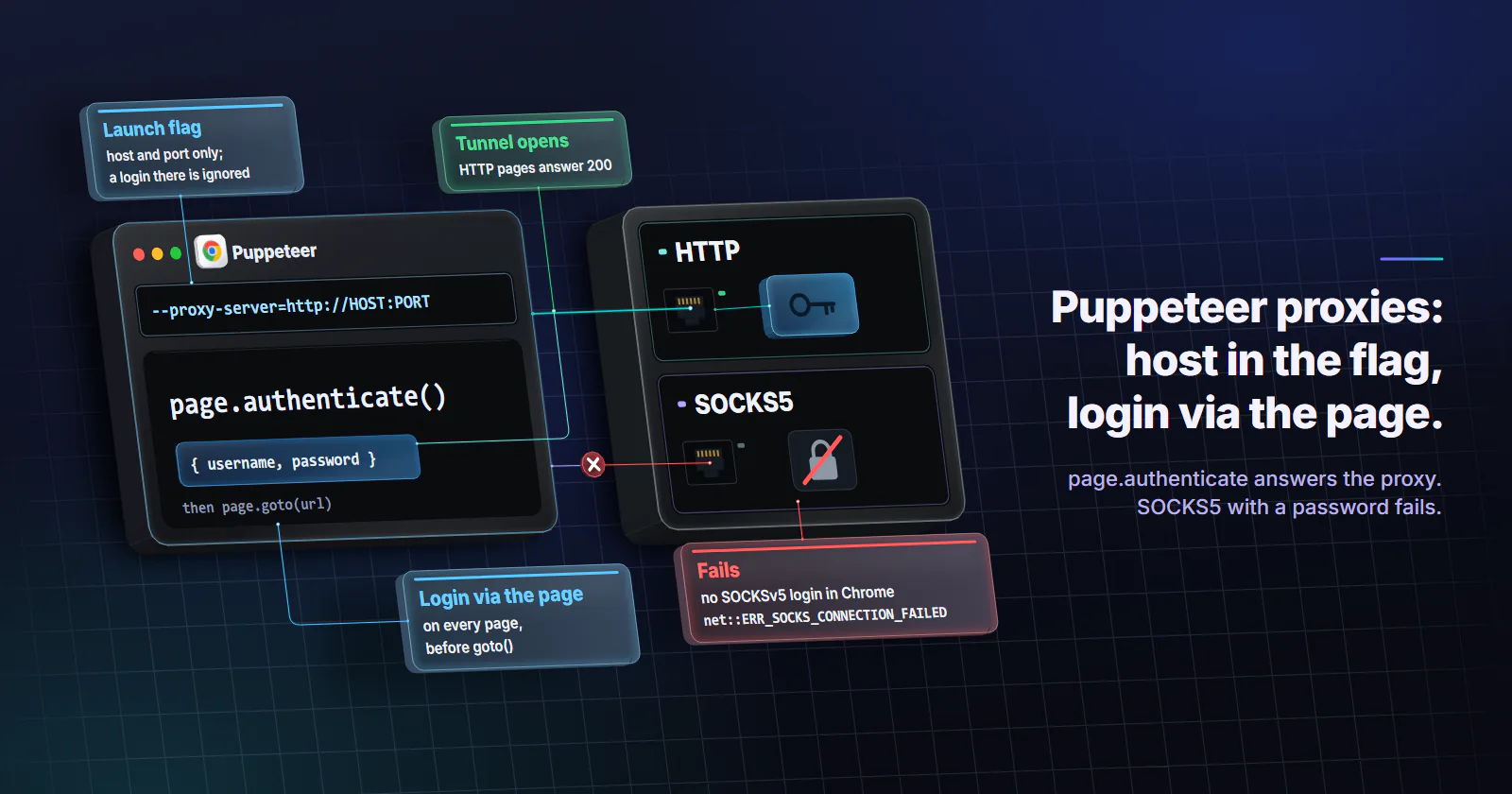
Quick summary · TL;DR
- Puppeteer takes a proxy per browser or per context. The --proxy-server launch flag covers the whole browser, and createBrowserContext({ proxyServer }) gives one isolated context its own exit inside the same browser.
- Credentials go through page.authenticate, never the flag. Chrome does not use credentials embedded in proxy settings, and a user:pass@ URL in --proxy-server fails with net::ERR_NO_SUPPORTED_PROXIES.
- A missing authenticate call looks like a network error. Current Chrome reports net::ERR_INVALID_AUTH_CREDENTIALS on HTTP pages and net::ERR_TUNNEL_CONNECTION_FAILED on HTTPS pages, not a 407 status.
- SOCKS5 with a password does not work in Chrome. Chrome supports no SOCKSv5 authentication methods, so a password-protected SOCKS5 server fails with net::ERR_SOCKS_CONNECTION_FAILED whatever page.authenticate says.
- Chrome allows 32 simultaneous connections through an HTTP/1.1 proxy. Heavy parallel work in one browser queues inside Chrome before the proxy sees it.
To use a Puppeteer proxy, launch Chrome with --proxy-server=http://HOST:PORT in args, then call page.authenticate({ username, password }) on each page before goto(). Credentials never go inside the flag, because Chrome ignores them there. For several exits in one browser, give each context its own proxy with browser.createBrowserContext({ proxyServer }).
import puppeteer from 'puppeteer';

const browser = await puppeteer.launch({
  args: ['--proxy-server=http://HOST:PORT'],
});
const page = await browser.newPage();
await page.authenticate({ username: 'USERNAME', password: 'PASSWORD' });
await page.goto('https://ipinfo.io/json');
console.log(await page.evaluate(() => document.body.innerText));
await browser.close();
That covers the happy path. The failures come later, as a script that worked yesterday dying with net::ERR_TUNNEL_CONNECTION_FAILED, a tutorial’s user:pass@host URL throwing an error the tutorial never mentions, or a SOCKS5 endpoint refusing every connection. Each one has its exact Chrome error string and fix below.
Puppeteer proxy setup: browser or context
Puppeteer has two native places for a proxy, and one browser process can use both.
Per browser. The --proxy-server launch flag routes every page in the browser through one exit. Right for a script that runs one identity.
Per context. browser.createBrowserContext() takes a proxyServer option. Each context is an isolated profile with its own cookies, cache and storage, and the BrowserContextOptions reference (accessed September 2026) says the username and password are set with page.authenticate. The browser itself can launch with no proxy at all, the same per-context model a Playwright proxy uses.
const browser = await puppeteer.launch();

async function contextWithProxy(server, username, password) {
  const context = await browser.createBrowserContext({ proxyServer: server });
  const page = await context.newPage();
  await page.authenticate({ username, password });
  return { context, page };
}

const a = await contextWithProxy('http://HOST:PORT', 'USERNAME_A', 'PASSWORD_A');
const b = await contextWithProxy('http://HOST:PORT', 'USERNAME_B', 'PASSWORD_B');
On Puppeteer 25.1.0 both http://HOST:PORT and bare HOST:PORT worked as proxyServer, and two contexts reached two different proxies from the same browser (the current release on npm is 25.12.0, checked 2026-09-29). Older releases were pickier: issue #13599 (February 2025) reports proxyServer rejecting a full URL after an upgrade to 24.x, so pin the format your version accepts.
A proxy per page
There is no per-page proxy inside a shared context. The native answer to “a different proxy for each page” is one page per context: the exit, cookies and cache then belong to that page alone. Packages that switch proxies per page work by intercepting every request and re-sending it from Node, which replaces Chrome’s own network stack, TLS and HTTP/2 included. That changes how the traffic looks to the target and costs speed, so the context route is the better default.
The bypass list
Traffic that needs no exit can skip it. --proxy-bypass-list="api.internal.example;*.mock.local" does it at launch, and proxyBypassList: ['api.internal.example'] does it per context. In the local test the bypassed host went direct and the proxy saw nothing. Use it to keep your own API, a mock server or telemetry off a metered proxy.
Proxy authentication in Puppeteer
page.authenticate() answers the proxy’s 407 Proxy Authentication Required challenge with the credentials you give it. The page.authenticate reference (accessed September 2026) notes that it switches on request interception, which may cost some performance. Three rules keep it working.
Call it on every page, before the first navigation. A page that navigates first gets an error, not a login prompt. Once one page has authenticated, Chrome may reuse the cached credentials for other pages in the same context, which is why a forgotten call can pass in testing and fail in production on a fresh context.
Keep credentials out of the flag. Chromium’s proxy documentation (accessed September 2026) says Chrome “will not use any credentials embedded in the proxy settings”. Chrome does more than ignore them: in the local test, --proxy-server=http://USERNAME:PASSWORD@HOST:PORT made every navigation fail with net::ERR_NO_SUPPORTED_PROXIES.
Do not send the header yourself. Some guides set Proxy-Authorization with page.setExtraHTTPHeaders(). On Chrome 149 that fails every request with net::ERR_INVALID_ARGUMENT, on HTTP and HTTPS pages alike.
Read the credentials from the environment so the same script runs locally and in CI:
const browser = await puppeteer.launch({
  args: [`--proxy-server=${process.env.PROXY_SERVER}`], // http://HOST:PORT
});
const page = await browser.newPage();
await page.authenticate({
  username: process.env.PROXY_USERNAME,
  password: process.env.PROXY_PASSWORD,
});
Every error string in this guide was reproduced on Puppeteer 25.1.0 with Chrome 149 headless, against a local proxy that requires Basic authentication.
SOCKS5 in Puppeteer
--proxy-server=socks5://HOST:PORT works, as long as the SOCKS5 server needs no password. The same Chromium document says Chrome supports no authentication methods for SOCKSv5. In the local test Chrome offered only the “no authentication” method, so a server that requires a username and password closed the handshake and the page failed with net::ERR_SOCKS_CONNECTION_FAILED. page.authenticate() cannot help: it answers HTTP 407 challenges, and SOCKS5 never sends one. Credentials inside a socks5:// flag fail with net::ERR_NO_SUPPORTED_PROXIES, like the HTTP case.
Two ways out:
- Use the HTTP endpoint with
page.authenticate(). Nothing is lost for browser traffic: HTTPS sites still run end to end inside a CONNECT tunnel. proxymint includes HTTP and SOCKS5 on every tier and authenticates by username and password, so for Puppeteer the HTTP endpoint is the route. - Run a local forwarder that accepts unauthenticated connections on localhost and adds credentials upstream (the proxy-chain npm package is a common one). One more process to keep alive, and a local port anyone on the machine can use.
DNS is not a reason to prefer SOCKS5 in Chrome. Per the Chromium document, name resolution happens on the proxy side for both HTTP and SOCKSv5 proxies, and the local SOCKS5 server received hostnames, not addresses. On proxymint’s per-GB gateway a CONNECT tunnel is resolved on the proxy side, in the exit country. Our measurement found no Via or Forwarded header at the target, and inside a CONNECT tunnel the gateway relays encrypted bytes it cannot add headers to, so the target sees Chrome’s own headers and nothing else.
Rotate the Puppeteer proxy by context
A page load is not one request. Chrome opens several connections for the document, scripts, images and API calls, and an HTTPS request through an HTTP proxy rides a CONNECT tunnel, a single connection from the exit to the target. So the exit a page uses is decided per new connection, not per goto().
That gives two ways to change the exit, and only one suits a browser.
Rotation at the gateway. The proxy hands out a new IP on every request or on a timer. Fine for an HTTP client that sends one request per job. Under a live page, new connections can land on different exits, so the target sees one visit arriving from several addresses.
Rotation by context. Give each context a sticky session, do the job, close the context, and open the next one on a different session. The IP, cookies and cache change together, so each job starts clean. With a list of endpoints, that becomes a round-robin, one entry per context:
const endpoints = [
  { server: 'http://HOST:PORT', username: 'USERNAME_1', password: 'PASSWORD_1' },
  { server: 'http://HOST:PORT', username: 'USERNAME_2', password: 'PASSWORD_2' },
  { server: 'http://HOST:PORT', username: 'USERNAME_3', password: 'PASSWORD_3' },
];

for (const [i, job] of jobs.entries()) {
  const { server, username, password } = endpoints[i % endpoints.length];
  const context = await browser.createBrowserContext({ proxyServer: server });
  const page = await context.newPage();
  await page.authenticate({ username, password });
  await runJob(page, job);
  await context.close(); // cookies, cache and exit retire together
}
Providers issue separate sessions as separate credentials or separate ports. On proxymint the rotation behaviour is set on the order: a new IP on every request, a timer from 5 to 60 minutes, or sticky for as long as the device stays online, and it can be changed later with the same logins. For browser work, sticky or a timer longer than the job is the setting to pick.
Verify the exit before the job runs
Check the exit from inside the page before real work, through the same session the job will use. A proxy moves the connection and changes nothing inside Chrome, so confirm the exit sits in the country the job needs, then ask for pages in the language of that market.
const page = await context.newPage();
await page.authenticate({ username: 'USERNAME', password: 'PASSWORD' });

// 1. Ask the exit where it is (any lookup that returns a country code works).
await page.goto('https://ipinfo.io/json');
const geo = JSON.parse(await page.evaluate(() => document.body.innerText));

// 2. Stop if the exit is not in the market the job needs.
const expected = 'DE';
if (geo.country !== expected) throw new Error(`exit is in ${geo.country}, job needs ${expected}`);

// 3. Ask for pages in that market's language.
await page.setExtraHTTPHeaders({ 'Accept-Language': 'de-DE,de;q=0.9' });
On a local run the Accept-Language header and navigator.language (with --lang=de-DE at launch) both came back German.
- A sticky session for the check. With a new IP per request, the lookup and the job can leave from different exits.
- The language of the market. An IP gives a location, and a Swiss exit alone does not say whether the page should be German, French or Italian, so set the language the job needs, with
--lang=de-DEat launch ifnavigator.languagemust match the header. - A re-check on long jobs. Home devices go offline and timers expire, so repeat the lookup on a schedule shorter than the session and rebuild the context when the answer changes.
- WebRTC kept on proxied paths. WebRTC prefers UDP, which an HTTP proxy does not carry and Chrome’s TCP-only SOCKSv5 support does not either, so add Chromium’s
--force-webrtc-ip-handling-policy=disable_non_proxied_udplaunch flag, confirm it on your runner with a WebRTC leak-test page, and expect in-page calls to stop working.
Debugging Puppeteer proxy errors
Most Puppeteer proxy failures are visible if something listens. page.goto() only reports the document, so log every failed request:
page.on('requestfailed', (req) => console.log(req.url(), req.failure()?.errorText));The strings then map to causes, and a curl proxy test on the same endpoint shows whether the fault sits in the proxy or in Chrome:
net::ERR_INVALID_AUTH_CREDENTIALS. The proxy sent a407and nothing answered it:page.authenticate()is missing, was called aftergoto(), or has the wrong credentials.net::ERR_TUNNEL_CONNECTION_FAILED. The proxy refused the CONNECT for an HTTPS page. Often the same missing-credentials case in disguise; otherwise a target port the gateway does not allow, or an upstream failure at the exit.net::ERR_NO_SUPPORTED_PROXIES. The--proxy-servervalue is malformed, usually because it hasuser:pass@in it.net::ERR_SOCKS_CONNECTION_FAILED. A SOCKS5 server that wants a password. Switch to HTTP withpage.authenticate().net::ERR_PROXY_CONNECTION_FAILED. Chrome cannot reach the proxy at all: wrong host or port, or a firewall on the runner.- An
http://URL ends up onhttps://. proxymint’s per-GB gateway answers every plain-HTTP request with a 301 to thehttps://address, and Chrome follows it. Point tests and IP lookups athttps://URLs so the first response is the page, not the redirect. - Throughput stalls under parallel load. Chrome allows 32 simultaneous connections through an HTTP/1.1 proxy. Many pages in one browser queue inside Chrome before the proxy sees them; spread the work over several browsers. The proxy performance guide covers the other connection limits worth checking.
- Everything checks out and the target still blocks. Treat the block as the site’s answer: stop, and check its terms and whether it offers an API or a data feed. A datacenter range is classified by its ASN before the browser sends anything, so choose the tier before the job starts, not after a block.
Puppeteer proxy checks before scaling
A browser moves far more bytes than an HTTP client, because each page pulls scripts, fonts and images. On a per-GB tier those bytes are billed, so block what the job does not need. Request interception runs fine next to page.authenticate(); in the local test the page loaded with a 200 and the image request was aborted.
await page.authenticate({ username: 'USERNAME', password: 'PASSWORD' });
await page.setRequestInterception(true);
page.on('request', (req) =>
  ['image', 'font', 'media'].includes(req.resourceType()) ? req.abort() : req.continue(),
);
Then pick the tier by what the target checks.
Residential, rotating or sticky. Monitoring and collection on public pages of targets that score IP networks, one home-connection exit per context. Rotating residential proxies on proxymint are usage-based per GB, with country, region and city targeting.
Static ISP. Logged-in work that runs for days on one account, where a changing IP is itself the anomaly. Static ISP proxies keep one ISP-registered address, assigned to your order for the whole billing term, so the exit check runs once and stays true.
Datacenter. QA of your own site, load tests and targets with no anti-bot scoring. The IP class does not matter there, which is the work datacenter proxies are built for.
Mobile. Only when the target insists on a mobile origin. Desktop browser automation rarely needs a carrier origin.
Free lists. Public lists are mostly dead or slow entries, and a working one is run by someone unknown who sees every hostname and all traffic not protected by TLS. Fine for a throwaway demo against a test page. Wrong for anything with a login, a cookie or customer data.
A proxy decides where each context’s connections leave from; what the page does after that is still the script’s job.
Frequently asked questions
Launch the browser with args set to --proxy-server=http://HOST:PORT, open a page, call page.authenticate with the username and password, and then navigate. For several exits in one browser, create a context per exit with browser.createBrowserContext({ proxyServer }) and authenticate each page in it. Never put the credentials inside the proxy URL.
Call await page.authenticate({ username, password }) on each page before the first goto. It answers the proxy 407 challenge and turns on request interception for that page. Credentials inside --proxy-server are not used by Chrome, and a Proxy-Authorization header set through setExtraHTTPHeaders fails with net::ERR_INVALID_ARGUMENT on current Chrome.
Not inside a shared context, because all pages in a context share its proxy. Create one browser context per page with createBrowserContext({ proxyServer }), which also gives each page its own cookies and cache. Packages that switch proxies per page re-send every request from Node, which replaces the browser network stack and is slower.
Puppeteer can use a SOCKS5 proxy through --proxy-server=socks5://HOST:PORT, but Chrome supports no SOCKSv5 authentication methods. A SOCKS5 server that requires a username and password fails with net::ERR_SOCKS_CONNECTION_FAILED, and page.authenticate cannot fix it. Use the provider HTTP endpoint with page.authenticate, or a local forwarder that adds the credentials upstream.
Give each browser context one sticky session or one endpoint from a list, run the job, close the context and open the next one on a different session. That changes the IP, cookies and cache together. Letting the gateway rotate per request under a live page can spread one page load across several exit IPs.
Both usually mean the proxy asked for credentials and got none. ERR_INVALID_AUTH_CREDENTIALS appears on HTTP pages and ERR_TUNNEL_CONNECTION_FAILED on HTTPS pages, when page.authenticate is missing, runs after goto, or has the wrong password. If authentication is correct, a tunnel failure points at a blocked target port or an upstream failure at the exit.
Technically yes, since any HTTP or SOCKS5 proxy without credentials works in --proxy-server. In practice most public list entries are dead or slow, and a working one is run by an unknown operator who can see every hostname and all unencrypted traffic. They suit a throwaway demo against a test page and are wrong for anything with a login, a cookie or customer data.
Researched and drafted with AI tools, then checked against our publishing rules before it went live: 4 outside links, 8 links to other proxymint pages, no prices and a fact-check pass against our product records. How we write.