Selenium proxy setup: auth, SOCKS5, Firefox and rotation
Set a Selenium proxy in Chrome and Firefox, add username and password auth tested on Selenium 4.50 and Chrome 154, fix SOCKS5 errors and rotate per driver.
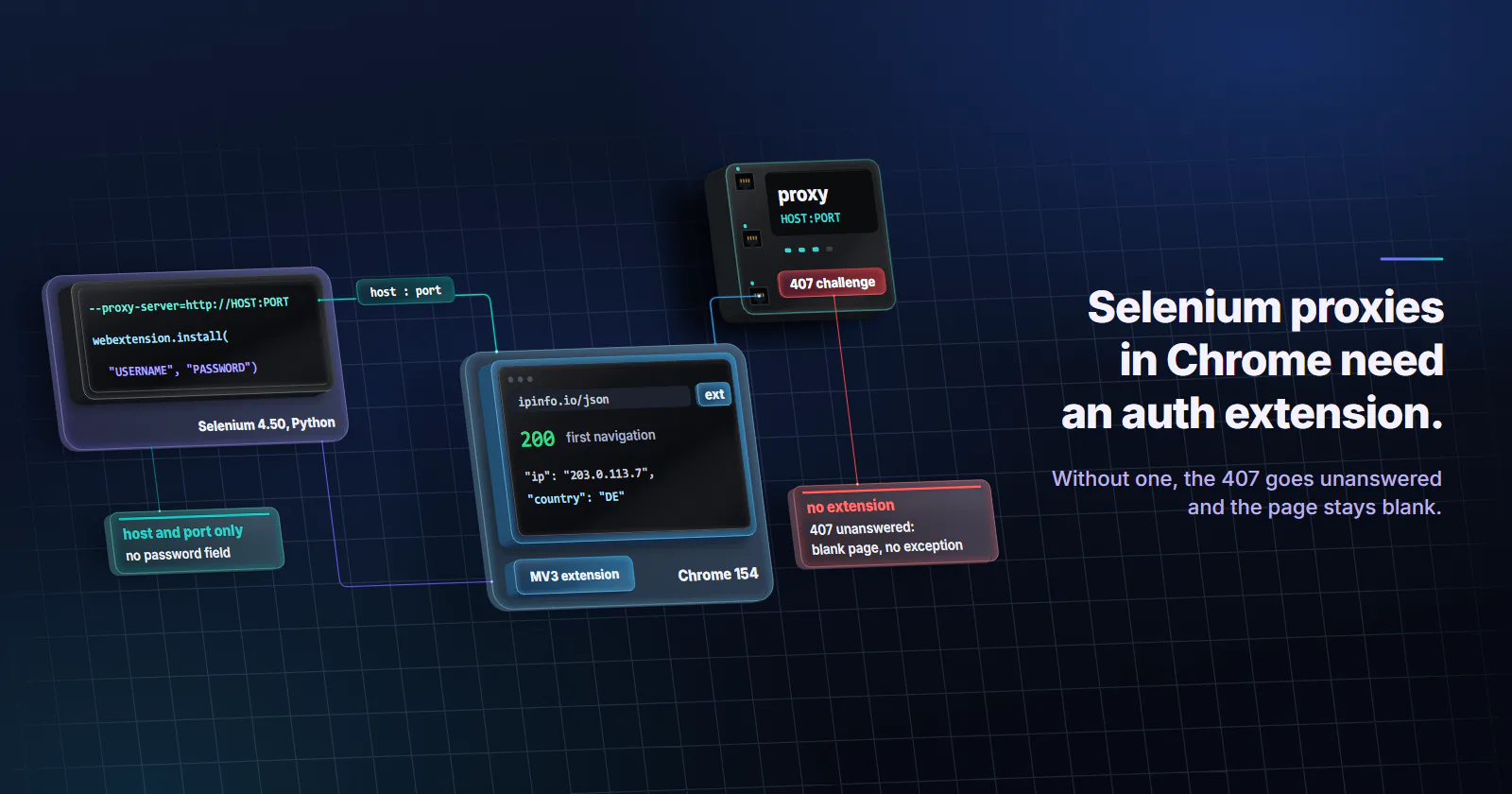
Quick summary · TL;DR
- Chrome takes a Selenium proxy as host and port only. The --proxy-server flag and Selenium's Proxy object both set the exit, and neither has a working field for an HTTP proxy password.
- A missing password fails silently. On Selenium 4.50 with Chrome 154, a proxy 407 with no answer left a blank page and driver.get() raised nothing, headless or headed.
- An MV3 extension or a CDP handler supplies the credentials. Installed through webextension.install(), the extension authenticated on the first navigation; branded Chrome has ignored --load-extension since version 137.
- selenium-wire is archived. The repository was archived on 2024-01-03, and a fresh install on 2026-10-06 failed on import, then failed on HTTPS pages once pinned.
- Chrome cannot send a SOCKS5 password. A password-protected SOCKS5 server fails with net::ERR_SOCKS_CONNECTION_FAILED, so use the provider's HTTP endpoint.
A Selenium proxy goes into ChromeOptions as --proxy-server=http://HOST:PORT, which carries a host and port only. Chrome ignores a username and password placed inside it, so an authenticated proxy needs a small Manifest V3 extension installed through webextension.install(), or a DevTools Fetch.authRequired handler. Both answered the proxy’s 407 challenge in a test on Selenium 4.50 and Chrome 154.
from selenium import webdriver

options = webdriver.ChromeOptions()
options.add_argument("--proxy-server=http://HOST:PORT")
driver = webdriver.Chrome(options=options)
driver.get("https://ipinfo.io/json")
print(driver.find_element("tag name", "body").text)
driver.quit()
That is the whole setup for a proxy without a password. Most paid proxies have one, and the usual fixes have aged badly. Branded Chrome no longer loads extensions from a flag, selenium-wire breaks on import, and the SOCKS5 extension trick never worked in Chrome. Every route below was run on 2026-10-06 against a local proxy that demands Basic authentication, with Selenium 4.50.0 for Python (released 2026-09-30), Chrome for Testing 154.0.8037.57 and the matching chromedriver.
Selenium proxy setup in Chrome
Selenium hands Chrome a proxy in two ways, and both end up as the same Chrome setting.
The launch flag. --proxy-server=http://HOST:PORT routes the whole browser through one exit. A bare HOST:PORT is read as HTTP and socks5://HOST:PORT selects SOCKS5. Keep http:// as the scheme even for HTTPS sites: they travel end to end inside a CONNECT tunnel, and the proxy relays bytes it cannot read.
The Proxy object. Selenium’s Proxy class sets the WebDriver proxy capability, which chromedriver turns into the same flag. It is the form that also works on Selenium Grid and other browsers:
from selenium.webdriver.common.proxy import Proxy, ProxyType

options.proxy = Proxy({
    "proxyType": ProxyType.MANUAL,
    "httpProxy": "HOST:PORT",
    "sslProxy": "HOST:PORT",
})
Neither form has a field for an HTTP proxy password. And Chrome holds one proxy per browser process, so a different exit means a different driver. Hosts that should skip the proxy, such as your own API or a mock server, go in --proxy-bypass-list="localhost;*.internal.example".
Selenium proxy authentication methods tested
Chromium’s proxy documentation (accessed October 2026) says Chrome “will not use any credentials embedded in the proxy settings”. Under Selenium, a proxy that asks for a password and gets none does not even produce an error.
The other common attempts fail in their own ways. USERNAME:PASSWORD@ inside --proxy-server produced Chrome’s ERR_NO_SUPPORTED_PROXIES page. The same string in the Proxy object’s httpProxy made driver.get() raise net::ERR_NAME_NOT_RESOLVED. A Proxy-Authorization header pushed through CDP Network.setExtraHTTPHeaders failed every request with ERR_INVALID_ARGUMENT. The table lists what remains, run the same way.
Chrome extension for proxy auth
A Manifest V3 extension answers the proxy challenge from inside Chrome. In MV3 it declares webRequest plus webRequestAuthProvider, the permission that lets onAuthRequired supply credentials. The listener checks isProxy, which Chromium’s webRequest schema (accessed October 2026) defines as true for Proxy-Authenticate and false for WWW-Authenticate, so it never answers a website’s own login prompt:
import json, os, tempfile

def proxy_auth_extension(username, password):
    folder = tempfile.mkdtemp()
    manifest = {
        "manifest_version": 3,
        "name": "proxy-auth",
        "version": "1.0",
        "permissions": ["webRequest", "webRequestAuthProvider"],
        "host_permissions": ["<all_urls>"],
        "background": {"service_worker": "background.js"},
    }
    creds = json.dumps({"username": username, "password": password})
    background = (
        "chrome.webRequest.onAuthRequired.addListener("
        f"(d) => d.isProxy ? {{ authCredentials: {creds} }} : {{}},"
        "{ urls: ['<all_urls>'] }, ['blocking']);"
    )
    with open(os.path.join(folder, "manifest.json"), "w") as f:
        json.dump(manifest, f)
    with open(os.path.join(folder, "background.js"), "w") as f:
        f.write(background)
    return folder

options = webdriver.ChromeOptions()
options.add_argument("--proxy-server=http://HOST:PORT")
options.enable_bidi = True
options.enable_webextensions = True
driver = webdriver.Chrome(options=options)
driver.webextension.install(path=proxy_auth_extension("USERNAME", "PASSWORD"))
driver.get("https://ipinfo.io/json")
webextension.install() uses the WebDriver BiDi command and returned only once the extension was in place, so the first navigation authenticated. Selenium’s enable_webextensions adds --enable-unsafe-extension-debugging and --remote-debugging-pipe, and its own docstring warns that the pipe disables many CDP features. Pick this route or the CDP route below, not both in one driver.
Chrome stops an idle extension service worker after 30 seconds and revives it for the next event, per its service worker lifecycle docs, and a listener registered at the top level of the script is in place as soon as the worker starts, per its events docs (both updated 2023-05-02). That is why background.js above registers the listener at the top level, with no keep-alive alarm. The run’s sessions were too short to watch a worker restart.
The older route, options.add_argument("--load-extension=PATH"), depends on the browser build. Branded Google Chrome dropped the flag in version 137: Selenium issue #15788 (opened 2025-05-24) shows chromedriver logging “—load-extension is not allowed in Google Chrome, ignoring.” Chrome for Testing and Chromium still accept it, and there the test hit a race: the first HTTP page came back blank before the extension’s service worker registered, and a second navigation, or a two-second wait, worked.
One more limit from the run: chrome-headless-shell, the old headless build, loaded no extension at all, so use full Chrome with --headless=new. Copied snippets that still declare manifest_version: 2 and webRequestBlocking belong to the extension model MV3 replaced.
SeleniumBase. The SeleniumBase wrapper builds the same kind of MV3 auth extension for you from Driver(proxy="USERNAME:PASSWORD@HOST:PORT"). Version 4.55.1 passed HTTP and HTTPS pages on Chrome for Testing 154. It loads the extension with --load-extension plus a Chrome feature switch meant to keep that flag alive, so run one check on branded Chrome before a Selenium proxy job depends on it.
CDP and BiDi auth handlers
The Chrome DevTools Protocol can answer the challenge without an extension: Fetch.enable with handleAuthRequests, then Fetch.continueWithAuth with ProvideCredentials on every Fetch.authRequired event. Selenium’s JavaScript binding wraps it in one call, and it passed for HTTP and HTTPS pages with selenium-webdriver 4.50.0:
const cdp = await driver.createCDPConnection('page');
await driver.register('USERNAME', 'PASSWORD', cdp);
await driver.get('https://ipinfo.io/json');
Python reaches the same Fetch domain through async with driver.bidi_connection(), about 25 lines of trio code with two listeners. It passed headless and headed; Chrome answered one challenge per session and reused the credentials after that. Two costs: CDP is Chrome-only, and Selenium 4.50 bundles DevTools bindings for Chrome 152 to 154, falling back to the newest of them on a later Chrome, so a protocol change in a new Chrome can break the handler until Selenium catches up.
WebDriver BiDi is the standard route that should replace CDP, and Selenium 4.50 exposes it as driver.network.add_auth_handler(username, password). On Chrome 154 it saw the proxy challenge, but answering it failed with “Invalid InterceptionId” and driver.get() timed out. Re-test it on each Selenium and Chrome release before relying on it.
Selenium Wire status in 2026
Rotation tutorials in the current results still build on it, some with pinned dependency versions in the install line. The selenium-wire repository was archived on 2024-01-03 with the note “Selenium Wire is no longer being maintained”, and its last PyPI release is 5.1.0 from 2022-10-15. A fresh pip install selenium-wire on 2026-10-06 pulled blinker 1.9.0 and failed on import with No module named 'blinker._saferef'. With blinker pinned below 1.8, HTTP pages loaded through the authenticated proxy and HTTPS pages failed with net::ERR_CONNECTION_CLOSED, because its bundled mitmproxy calls an X509 method that pyOpenSSL 26.4.0 no longer has.
It works by decrypting every HTTPS connection with its own certificate authority and re-encrypting it upstream, so the TLS handshake the site sees comes from Python’s TLS stack instead of Chrome’s. Treat it as legacy code to migrate off.
SOCKS5 and Firefox proxies
SOCKS5 proxy in Selenium
A Selenium SOCKS5 proxy works when the SOCKS5 server needs no password: --proxy-server=socks5://HOST:PORT. The Chromium document states that “no authentication methods are supported for SOCKSv5 in Chrome”. In the run, Chrome offered the SOCKS5 server only the “no authentication” method, the password-protected server refused it, and driver.get() raised net::ERR_SOCKS_CONNECTION_FAILED. The same happened with socksUsername and socksPassword in the Proxy object, and with the auth extension loaded: SOCKS5 never sends a 407, so onAuthRequired never fires.
So when the SOCKS5 endpoint wants a username and password, use the provider’s HTTP endpoint with the extension. HTTPS pages still run end to end inside the CONNECT tunnel. DNS is no reason to prefer SOCKS5 in Chrome either: Chromium resolves names on the proxy side for HTTP and SOCKSv5 proxies, and the test SOCKS5 server received hostnames, not addresses. The wider tradeoffs between the two protocols are in SOCKS5 vs HTTP proxies. On proxymint every IP of a static ISP proxy order comes with its own username and password and an HTTP and a SOCKS5 port, and for Selenium Chrome the HTTP port is the one to use.
Firefox proxy settings
Firefox takes its proxy from preferences, which FirefoxOptions sets before launch:
options = webdriver.FirefoxOptions()
options.set_preference("network.proxy.type", 1)  # manual configuration
options.set_preference("network.proxy.http", "HOST")
options.set_preference("network.proxy.http_port", PORT)
options.set_preference("network.proxy.ssl", "HOST")
options.set_preference("network.proxy.ssl_port", PORT)
driver = webdriver.Firefox(options=options)
For SOCKS5, set network.proxy.socks, network.proxy.socks_port, network.proxy.socks_version to 5 and network.proxy.socks_remote_dns to True, so names resolve at the proxy. Mozilla’s enterprise policy documentation (accessed October 2026) lists all of these as the preferences its Proxy policy sets, including the SOCKS v5 DNS switch. For a password, the same onAuthRequired listener runs as a Firefox add-on installed with driver.install_addon(path, temporary=True), with "background": {"scripts": ["background.js"]} in place of service_worker in the manifest: MDN’s background key reference (accessed October 2026) lists service_worker as unsupported in Firefox. The Firefox path was not part of this run, so test it on your setup before a long job.
Rotating proxies in Selenium
One page load opens many connections: the document, scripts, images and API calls, each HTTPS one inside its own CONNECT tunnel. A proxy that rotates on every request can spread that page view across several exits, and a site that ties a session to its IP sees the visitor change networks mid-page.
For a Selenium proxy pool, rotate per driver. Give each driver one sticky session or one fixed IP, run the job, quit, and start the next driver on the next login:
endpoints = [
    ("http://HOST:PORT", "USERNAME_1", "PASSWORD_1"),
    ("http://HOST:PORT", "USERNAME_2", "PASSWORD_2"),
]

for i, job in enumerate(jobs):
    server, username, password = endpoints[i % len(endpoints)]
    options = webdriver.ChromeOptions()
    options.add_argument(f"--proxy-server={server}")
    options.enable_bidi = True
    options.enable_webextensions = True
    driver = webdriver.Chrome(options=options)
    driver.webextension.install(path=proxy_auth_extension(username, password))
    try:
        run_job(driver, job)
    finally:
        driver.quit()  # exit, cookies and cache retire together
How each rotation mode holds a session is covered in rotating vs sticky proxies. On proxymint’s per-GB tiers the rotation is set on the order: a new IP on every request, a timer from 5 to 60 minutes, or sticky for as long as the device stays online, changeable later with the same logins. For Selenium, sticky or a timer longer than the job fits. A static ISP IP does not rotate at all; moving to the next IP’s login is the rotation.
Verify the exit, debug errors
Because a missing credential shows up as a blank page, make the first request of every Selenium proxy session an IP lookup that must parse:
import json

driver.get("https://ipinfo.io/json")
exit_info = json.loads(driver.find_element("tag name", "body").text)
if exit_info.get("country") != "DE":
    raise RuntimeError(f"exit is in {exit_info.get('country')}, job needs DE")
A blank page makes json.loads raise, which turns the silent failure into a loud one. For pages in the market’s language, set options.add_experimental_option("prefs", {"intl.accept_languages": "de-DE,de"}): in the headless run it changed both the Accept-Language header and navigator.language, while --lang=de-DE changed neither.
Use https:// URLs for checks. proxymint’s per-GB gateway answers plain http:// requests with a 301 to the HTTPS address, measured in proxymint Lab #1, so an http:// health check sees a redirect first. Then map what Selenium reports to a cause:
- Blank page, no exception. The proxy sent a 407 and nothing answered it: no extension, the extension not ready yet, or
chrome-headless-shell. ERR_NO_SUPPORTED_PROXIES. The--proxy-servervalue is malformed, usually because it containsuser:pass@. Proxy string formats shows which part of a provider’s string goes where.net::ERR_NAME_NOT_RESOLVEDright after launch. Credentials inside theProxyobject, or a target name the exit cannot resolve.net::ERR_SOCKS_CONNECTION_FAILED. A SOCKS5 server that wants a password. Switch to the HTTP endpoint.--load-extension is not allowed in Google Chrome, ignoring.Branded Chrome 137 or later. Install the extension through BiDi or run Chrome for Testing.- Traffic you never requested. Chrome’s own background requests ride the proxy too: before the first page, Chrome for Testing contacted Google update and account hosts through the test proxy. On a per-GB tier those bytes count toward usage like any other.
- Parallel pages stall. Chrome caps an HTTP/1.1 proxy at 32 simultaneous connections, so spread heavy work across drivers.
- The target blocks a correct setup. Stop and read its terms, and check for an API or data feed. How websites detect proxies explains what a site sees before the browser sends a byte.
Choosing the proxy type
The IP type behind a Selenium proxy follows from what the job does, not from the library.
Static ISP. Logged-in runs that last days, and test suites that reach a partner’s staging system through a firewall that admits one fixed address. Static ISP proxies keep one ISP-registered address, assigned to your order for the whole billing term, so the exit stays the same from one run to the next.
Residential, rotating or sticky. Monitoring public pages across markets, with country, region and city targeting and one sticky session per driver. Rotating residential proxies are usage-based per GB.
Datacenter. QA and load tests of your own site, and targets without anti-bot scoring, the work datacenter proxies are built for.
Mobile. Only when the target expects a mobile origin, which desktop Selenium rarely needs.
Which Selenium proxy route to use
Python: install the MV3 extension with webextension.install(), which does not depend on the --load-extension flag branded Chrome dropped, and point --proxy-server at the provider’s HTTP endpoint. On Chrome for Testing or Chromium, --load-extension works too, once the first navigation waits for the extension. Node: driver.register() over CDP. A SOCKS5 endpoint with a password: switch to its HTTP endpoint, because no Selenium Chrome setting can send a SOCKS5 password. Existing selenium-wire code: migrate it to the extension before the next dependency update breaks it. And whichever route runs, make an IP lookup the first page of every driver, so a blank page stops the job instead of feeding it.
Frequently asked questions
Add --proxy-server=http://HOST:PORT to ChromeOptions with options.add_argument, then start webdriver.Chrome with those options. Selenium's Proxy object with httpProxy and sslProxy does the same through the WebDriver capability. Both take a host and port only, so an authenticated proxy also needs an extension or a CDP handler for the password.
Install a small Manifest V3 extension that answers chrome.webRequest.onAuthRequired when isProxy is true, using driver.webextension.install() with enable_bidi and enable_webextensions set. On Selenium 4.50 and Chrome 154 it authenticated on the first navigation. A CDP Fetch.authRequired handler also works, and the JavaScript binding wraps it as driver.register().
The project was archived on 2024-01-03 and its last release, 5.1.0, dates from October 2022. A fresh install on 2026-10-06 failed on import because of a newer blinker package, and with blinker pinned, HTTPS pages failed against pyOpenSSL 26.4.0. Existing code may run with old pins, but new code should use an extension or CDP for proxy credentials.
Not in Chrome. Chrome supports no SOCKS5 authentication methods, so a password-protected SOCKS5 server fails with net::ERR_SOCKS_CONNECTION_FAILED, whether the credentials go in the Proxy object or an extension. Use the provider's HTTP endpoint with the auth extension; HTTPS sites still run end to end through the CONNECT tunnel.
Chrome holds one proxy per browser process, so rotation means one driver per exit. Start a driver on one sticky session or fixed IP, run the job, quit it, and start the next driver on the next login. Rotating per request under a live page can spread one page view across several exit IPs.
Branded Google Chrome stopped accepting the --load-extension flag in version 137, and chromedriver logs that the flag is not allowed. Install the extension with Selenium's BiDi webextension.install() instead, or run Chrome for Testing or Chromium. The old chrome-headless-shell build loads no extensions at all.
Set preferences on FirefoxOptions: network.proxy.type to 1, then network.proxy.http and network.proxy.http_port, and network.proxy.ssl and network.proxy.ssl_port for HTTPS. For SOCKS5, set network.proxy.socks, its port, socks_version 5 and socks_remote_dns true. A password needs an add-on with an onAuthRequired listener, installed with driver.install_addon.
Researched and drafted with AI tools, then checked against our publishing rules before it went live: 9 outside links, 10 links to other proxymint pages, no prices and a fact-check pass against our product records. How we write.