
wget proxy: https_proxy, auth, .wgetrc and exit codes
Run wget through a proxy with https_proxy or -e, pass credentials safely, set .wgetrc and no_proxy, read exit codes 4 and 8, and see why SOCKS5 fails.
Quick summary · TL;DR
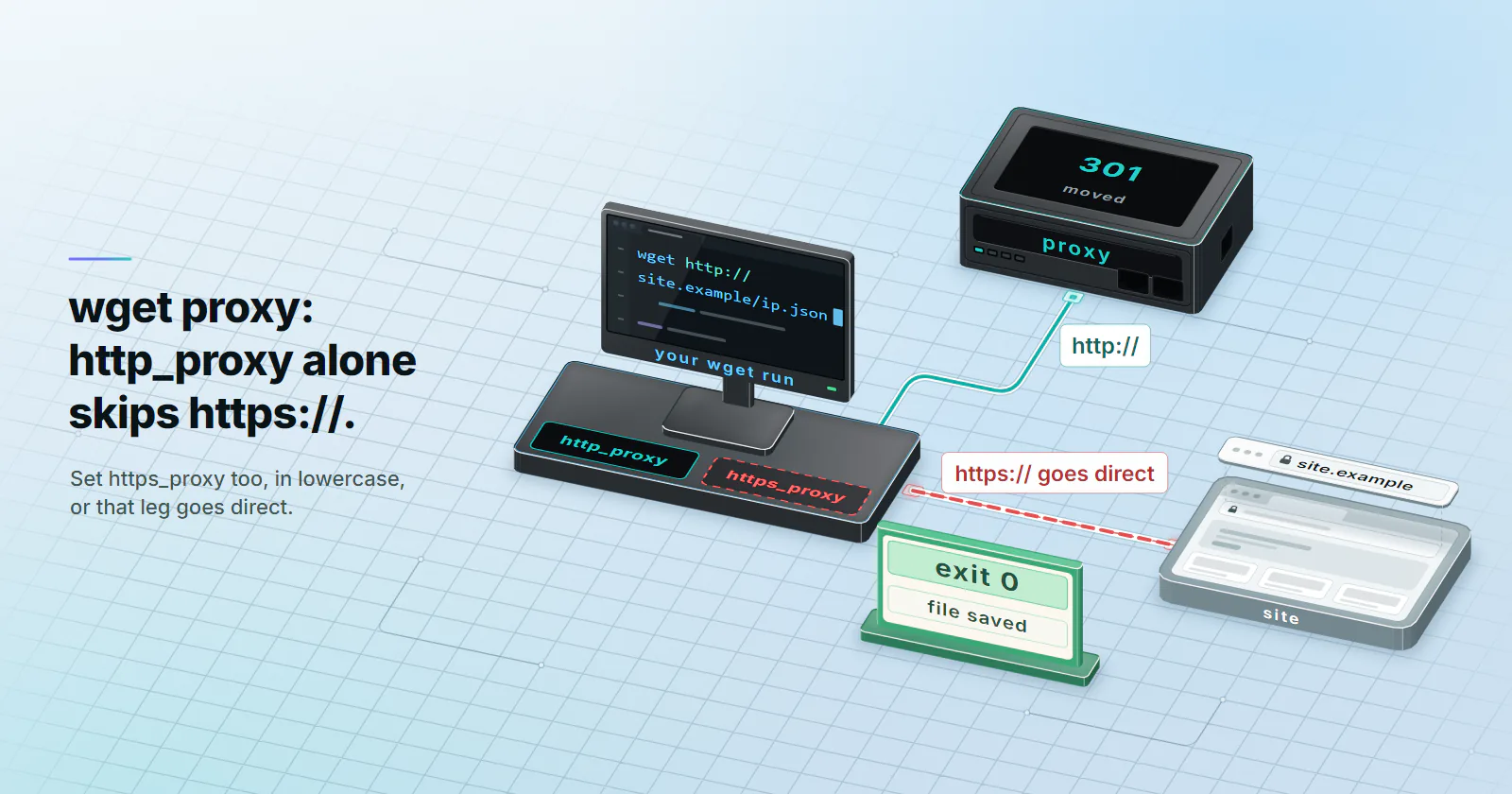
- Set https_proxy, in lowercase, for https:// downloads. wget picks the variable by the scheme of the URL you fetch, so http_proxy alone leaves every https:// download going direct, and it never reads HTTPS_PROXY in capitals.
- For one command, use -e. wget -e use_proxy=yes -e https_proxy=http://HOST:PORT URL changes nothing else on the machine, which is what you want while you are still testing.
- Put the password in --proxy-password if it has an @ or a colon. In the URL form a raw @ breaks the parse (p@ss:word stops with 'Bad port number'), and the flags win over URL credentials anyway.
- wget can't do SOCKS5. A socks5:// value fails with 'Unsupported scheme', so you use the provider's HTTP endpoint, or curl, for that job.
- A 407 on an https:// URL exits 4, not 6. wget prints 'Proxy tunneling failed: Proxy Authentication Required' and reports it as a network failure, which throws off scripts that check for code 6.
To use a wget proxy, set the lowercase variable for the scheme you download: https_proxy=http://USERNAME:PASSWORD@HOST:PORT wget https://example.com/file. For one command only, pass -e use_proxy=yes -e https_proxy=http://HOST:PORT with --proxy-user and --proxy-password. The proxy URL starts with http:// even for https:// downloads, and wget has no SOCKS support at all.
That covers the happy path. The rest of this guide is for the moment it doesn’t work: wget downloads fine but from your own address, a password that works in the browser gets a 407, or a script reports exit code 4 and nothing else. wget is quiet about most of these, which is the annoying part.
Every transcript below comes from GNU Wget 1.21.4 on Linux against a local test proxy with Basic authentication, run on 2026-10-25, with hosts and credentials replaced by placeholders. Behaviour is checked against the GNU Wget manual and the proxy lookup in wget’s src/retr.c, both read from the 1.25.0 source (the current release, November 2024, checked 2026-10-25). Where 1.25.0 behaves differently from 1.21.4, the guide says so.
wget proxy setup in three ways
There are three places a wget proxy can come from, and you’ll want to know all three, because they override each other.
Environment variables. The shell or CI job sets http_proxy and https_proxy, and wget picks them up. Good for a box where everything goes through one proxy.
export http_proxy='http://USERNAME:PASSWORD@HOST:PORT'
export https_proxy='http://USERNAME:PASSWORD@HOST:PORT'
wget https://example.com/file.tar.gz
The -e flag for one run. -e runs a .wgetrc command from the command line, so the proxy lives and dies with that one call. This is the form to use while you are still finding out whether the proxy works.
wget -e use_proxy=yes -e https_proxy=http://HOST:PORT \
     --proxy-user=USERNAME --proxy-password='PASSWORD' \
     https://example.com/file.tar.gz
There is no --proxy=URL flag, which is the first thing most people try. wget 1.21.4 keeps --proxy as an on/off switch, so a URL there stops it before any request:
wget: --proxy: Invalid boolean 'http://HOST:PORT'; use `on' or `off'.wget exits 2 on it, the code for a parse error. The URL always goes through -e, a variable or a startup file.
A .wgetrc file. ~/.wgetrc for you, /etc/wgetrc for everyone on the machine. It is covered further down, because it has the one precedence rule that catches people out.
Whichever you use, the first line after the timestamp tells you whether the proxy carried the request. Connecting to HOST:PORT... connected. followed by Proxy request sent, awaiting response... is the proxy. Resolving example.com (example.com)... followed by the site’s own address means wget went direct, whatever you think you set.
https_proxy, http_proxy and case
wget chooses the proxy by the scheme of the URL you download, not by the scheme of the proxy. In the source, getproxy() reads http_proxy for http:// URLs, https_proxy for https:// URLs and ftp_proxy for FTP (ftps_proxy for FTPS), and nothing else. There’s no fallback between them. Three things follow from that, and each one fails silently.
- http_proxy alone does not cover HTTPS. With only
http_proxyset,wget https://site.example/ip.jsonprintedResolving site.example... 127.0.0.2andConnecting to site.example|127.0.0.2|:443in the test: straight to the site, exit 0, no warning. - Uppercase is ignored.
HTTPS_PROXY,HTTP_PROXYandNO_PROXYin capitals did nothing in the same test. A DockerfileENV HTTPS_PROXY=...line or a CI variable named in capitals is invisible to wget, even though curl readsHTTPS_PROXYin that same container. - The proxy URL keeps http://. The
httpsinhttps_proxynames the download, not the link to the proxy. wget talks plain HTTP to the proxy and opens a CONNECT tunnel for the https:// site, so TLS still runs end to end with the site. Writinghttps://in front of the proxy doesn’t add TLS to that first hop either: 1.21.4 acceptedhttps_proxy=https://HOST:PORTand spoke plain HTTP to the proxy anyway, which matches the 1.25.0 source, where wget only starts TLS with the site after the CONNECT.
Here is that redirect in the local test, with a proxy set to answer plain HTTP with a 301 and only http_proxy exported:
--2026-10-25 06:17:50--  http://site.example/ip.json
Connecting to HOST:PORT... connected.                <- the proxy
Proxy request sent, awaiting response... 301 Moved Permanently
Location: https://site.example/ip.json [following]
--2026-10-25 06:17:50--  https://site.example/ip.json
Resolving site.example (site.example)... 127.0.0.2   <- direct from here on
Connecting to site.example (site.example)|127.0.0.2|:443... connected.
HTTP request sent, awaiting response... 200 OK
Exit 0 and the file is saved, so nothing tells you the second half skipped the proxy. With https_proxy set as well, the second leg printed Connecting to HOST:PORT again and the proxy logged a CONNECT site.example:443.
The GitLab engineering post We need to talk: Can we standardize NO_PROXY? (updated June 2025) compares how curl, wget, Python, Go and Ruby read these variables. wget is the strict one: lowercase only.
wget proxy authentication
wget implements one scheme for proxy authentication, Basic, and the manual says so plainly. It sends the Proxy-Authorization header on the first request without waiting for a challenge, so a correct password costs no extra round trip. Credentials can go in two places.
In the proxy URL: http://USERNAME:PASSWORD@HOST:PORT. This is the only form environment variables can carry. Reserved characters in the password break it. A password of p@ss:word written raw stopped wget before it sent anything:
Error parsing proxy URL http://USERNAME:p@ss:word@HOST:PORT: Bad port number.That run exited 8. A lone raw @, as in p@ssword, fails differently: wget reads ssword@HOST as the host name, reports unable to resolve host address and exits 4. A raw colon with no @ after it went through intact. Percent-encoding fixes all of it: @ becomes %40 and : becomes %3A, so the URL reads http://USERNAME:p%40ss%3Aword@HOST:PORT, and that one authenticated.
In the flags: --proxy-user=USERNAME --proxy-password='PASSWORD'. Here wget takes the value literally. The raw p@ss:word authenticated, and the encoded p%40ss%3Aword got a 407, because wget sent the percent signs as typed. So you encode in the URL and never in the flags. Easy to get backwards when you copy a working URL into a flag.
When the URL and both flags carry credentials, the flags win. A wrong password in https_proxy with the right one in --proxy-password authenticated; the reverse failed. That is handy for keeping the host in the environment and the secret in a flag read from a secret store.
A password on the command line also lands in shell history and in the process list. On a shared machine, .wgetrc with tight permissions is the better home for it. wget’s --ask-password only prompts for site passwords, not the proxy one, so it doesn’t help here. For more on how providers format these strings, see proxy string formats.
wgetrc proxy settings
For a permanent wget proxy, use a startup file. wget reads the system file first (/etc/wgetrc on most distributions, /usr/local/etc/wgetrc for a source build), then $WGETRC if that is set, otherwise ~/.wgetrc. Later files win.
use_proxy = on
http_proxy = http://HOST:PORT
https_proxy = http://HOST:PORT
proxy_user = USERNAME
proxy_password = PASSWORD
no_proxy = localhost,127.0.0.1,.internal.example
Run chmod 600 ~/.wgetrc once it holds a password. Settings in .wgetrc also override the environment, which is the one that catches people out. The manual describes these lines as overriding “the proxy settings specified by the environment”, and the test agreed. With https_proxy exported to a dead port and a working proxy in .wgetrc, wget used the .wgetrc one. If an exported variable seems to do nothing, a forgotten https_proxy line in a startup file is the first thing to look for, and /etc/wgetrc on Debian and Ubuntu ships with commented proxy lines that someone may have uncommented years ago.
wget --no-config skips every startup file for one run, which is the quickest way to rule them out. To turn the proxy off from a file or -e, the command is use_proxy = off. The manual’s Proxies section also lists proxy = on/off, but wget 1.21.4 rejected it:
wget: Invalid --execute command 'proxy=off'Skipping the proxy with no_proxy
no_proxy takes a comma-separated list of domain suffixes that go direct, compared with the host name exactly as written in the URL, never with the address it resolves to. Matching works on whole labels: example matched site.example in the test, while ample did not. A leading dot (.internal.example) covers subdomains only: no_proxy=.site.example still sent site.example itself through the proxy, so list the bare name too if you need it. wget does not understand CIDR ranges, so 127.0.0.0/8 did not exempt http://127.0.0.2/, while the literal 127.0.0.2 did. And a URL that names a host is never matched by that host’s IP, so no_proxy=127.0.0.2 still sent site.example through the proxy. Only the lowercase no_proxy is read.
For a single run, --no-proxy or -e use_proxy=off turns the proxy off whatever the environment and startup files say.
SOCKS5 and wget
GNU wget speaks to HTTP proxies only. Give it a SOCKS URL and it stops before connecting:
Error parsing proxy URL socks5://HOST:PORT: Unsupported scheme.That exits 8. Wget2, the rewrite, lacks SOCKS too; the feature request is still open. You have three ways out.
- Use the HTTP endpoint. Most providers serve HTTP and SOCKS5 side by side. Every proxymint tier includes both, so wget simply uses the HTTP one.
- Use curl for the SOCKS job. curl takes
socks5h://, which resolves the hostname at the proxy. The SOCKS5 vs HTTP proxy guide covers when SOCKS is worth it. - Wrap wget.
proxychains4 wget URLwith proxychains-ng pushes wget’s TCP connections through a SOCKS proxy. Turn on itsproxy_dnsoption, or the lookup leaves from your machine: a proxy DNS leak.
Check which wget you have. Fedora 40 replaced wget with wget2 through the wget2-wget package (Fedora change page, 2024), and Alpine images ship BusyBox wget. Same command name, different programs. Run wget --version before you trust any behaviour in this guide on a new box.
Reading wget proxy errors
wget’s exit codes are coarse, and with a proxy they don’t always mean what the manual’s labels suggest. The manual lists 4 as network failure, 6 as authentication failure and 8 as a server error response. Here is what each proxy failure printed and returned in the test:
| What went wrong | What wget printed | Exit |
|---|---|---|
| Proxy port closed | Connecting to HOST:PORT... failed: Connection refused. | 4 |
| Proxy hostname wrong | wget: unable to resolve host address 'HOST' | 4 |
| Port left out | Dialled port 80: Connecting to HOST:80... failed | 4 |
| 407, https:// download | Proxy tunneling failed: Proxy Authentication RequiredUnable to establish SSL connection. | 4 |
| 407, http:// download | ERROR 407: Proxy Authentication Required. | 8 |
Raw p@ss:word in URL password | Error parsing proxy URL ...: Bad port number. | 8 |
Raw p@ssword in URL password | wget: unable to resolve host address 'ssword@HOST' | 4 |
--proxy=http://HOST:PORT | wget: --proxy: Invalid boolean 'http://HOST:PORT' | 2 |
| socks5:// proxy URL | Error parsing proxy URL ...: Unsupported scheme. | 8 |
Login in the proxy URL but no http:// | Error in proxy URL ftp://USERNAME/PASSWORD@HOST:PORT: Must be HTTP. | 8 |
The row that trips scripts is the HTTPS 407. A wrong proxy password on an https:// download returns 4, the same code as a dead proxy, because the CONNECT tunnel fails before any HTTP response exists. Exit 6 never showed up for a proxy failure. So a script that retries on 4 will hammer a proxy with a bad password, and one that checks for 6 will never see it. Grep the output for Proxy Authentication Required instead. The two messages run together without a space; that’s wget’s output, not a typo here.
The last row is a 1.21.4 quirk: without a scheme, wget read USERNAME:PASSWORD@HOST:PORT as an old FTP shorthand. A bare HOST:PORT with no login was taken as http:// and worked. Release 1.25.0 removed the shorthand URL forms, so write http:// in front of every proxy URL and the version stops mattering.
-S (--server-response) prints the proxy’s headers on an http:// download, so you can read the Proxy-Authenticate challenge. The 407 Proxy Authentication Required guide walks through the fixes once you know the login is the problem.
A five-step wget proxy test
Run these in order and stop at the first one that fails. Each one isolates one layer.
P='http://HOST:PORT'

# 1. Reach: expect 'connected.' then 'Proxy Authentication Required'
wget -e use_proxy=yes -e https_proxy=$P -O /dev/null https://example.com

# 2. Log in: expect 200 OK and exit 0
wget -e use_proxy=yes -e https_proxy=$P --proxy-user=USERNAME \
     --proxy-password='PASSWORD' -O /dev/null https://example.com

# 3. Exit: compare with the same call without the proxy
wget -q -O - -e use_proxy=yes -e https_proxy=$P --proxy-user=USERNAME \
     --proxy-password='PASSWORD' https://ipinfo.io/json

# 4. Rotation: separate runs, one address each
for i in 1 2 3 4 5; do
  wget -q -O - -e use_proxy=yes -e https_proxy=$P --proxy-user=USERNAME \
       --proxy-password='PASSWORD' https://ipinfo.io/ip; echo
done

# 5. Config: make sure no startup file overrides the test
wget --no-config -e use_proxy=yes -e https_proxy=$P --proxy-user=USERNAME \
     --proxy-password='PASSWORD' -O /dev/null https://example.com
Step 1 sends no credentials on purpose. A 407 there is good news: the proxy is up and listening on that port. Connection refused means the host or port is wrong, and no password change will help.
Step 3 uses an IP echo endpoint; ipinfo.io is one example, any service that returns the caller’s address and country works. The address should differ from your direct one, and the country should match what you ordered. A right address in the wrong country passes a check that only compares addresses and skews every geo-dependent download after it.
Step 4 is about rotation. With rotation set to every request, each run should print a different address; with a sticky session, the same one. On proxymint’s per-GB tiers, rotation is chosen on the order, either a new IP on every request, a timer from 5 to 60 minutes, or sticky for as long as the device stays online, and you can change it later with the same credentials. Keep each check a separate wget run, so the result doesn’t depend on whether a connection was reused.
For recursive jobs (-r, -m), the proxy settings apply to every file the crawl fetches. wget honours robots.txt by default in recursive mode, and --wait with --limit-rate keeps the job polite to the server. Keep both when you add a proxy; the site’s robots.txt and rate limits still apply to you from the new address.
Choosing the proxy type
wget doesn’t care what sits behind the proxy URL, but the server you download from often does.
Your own servers, mirrors and package downloads: datacenter proxies fit. IPv4 proxies are billed per IP per month and not metered per GB, which suits a large mirror or a nightly fetch, and lenient targets don’t care that the address belongs to a hosting network. For a big job, spread the load across a few IPs instead of pushing one hard.
Content that changes by country or by home network: use rotating residential proxies with country targeting, and run step 3 on every new order. Sites that show home users different pages from hosting ranges answer a residential exit the way they answer a customer.
A corporate proxy at work: nothing to buy. Get the host, port and login from IT, put them in ~/.wgetrc, and check /etc/wgetrc for a stale line first. If the office proxy inspects TLS, https:// downloads stop with ERROR: cannot verify example.com's certificate and exit 5. Ask IT for their CA certificate and pass it with --ca-certificate=/path/to/corp-ca.pem (or ca_certificate in .wgetrc) rather than reaching for --no-check-certificate, which turns verification off for every site.
Frequently asked questions
Set the lowercase environment variable for the scheme you download, for example https_proxy=http://HOST:PORT wget https://example.com/file. For a single command without touching the environment, use wget -e use_proxy=yes -e https_proxy=http://HOST:PORT followed by the URL. The proxy URL itself starts with http:// even when the download is https://.
Use --proxy-user=USERNAME and --proxy-password=PASSWORD, or put them in the proxy URL as http://USERNAME:PASSWORD@HOST:PORT. wget sends them with Basic authentication, the only proxy scheme it implements. In the URL form, percent-encode @ as %40 and : as %3A; in the flags, write the password as it is, because wget does not decode it there.
GNU wget reads only the lowercase names: http_proxy, https_proxy, ftp_proxy, ftps_proxy and no_proxy. An uppercase HTTPS_PROXY is ignored without any warning, and the download goes direct. A proxy setting in .wgetrc also overrides the environment, so check that file if the lowercase variable seems to do nothing.
No. GNU wget supports HTTP proxies only, and a socks5:// proxy URL fails with 'Error parsing proxy URL: Unsupported scheme.' Wget2 has no SOCKS support either. Use the HTTP endpoint of the same proxy, use curl with socks5h://, or run wget under a wrapper such as proxychains-ng.
Set no_proxy to a comma-separated list of domain suffixes, such as no_proxy=localhost,.internal.example. A suffix matches whole labels, so example matches site.example but ample does not, and CIDR ranges are not understood. To skip the proxy for one run, add --no-proxy or -e use_proxy=off.
Add use_proxy = on, http_proxy, https_proxy, proxy_user and proxy_password lines to ~/.wgetrc, or to /etc/wgetrc for every user. Settings in .wgetrc override environment variables. Restrict the file with chmod 600 when it holds a password, and run wget --no-config when you need a run that ignores it.
Exit code 4 is a network failure. With a proxy it covers a refused or unreachable proxy port, a proxy hostname that does not resolve, and a 407 on an https:// download, because the CONNECT tunnel fails before any HTTP response arrives. A 407 on a plain http:// download exits 8 instead.
Researched and drafted with AI tools, then checked against our publishing rules before it went live: 4 outside links, 7 links to other proxymint pages, no prices and a fact-check pass against our product records. How we write.