
PowerShell proxy: Invoke-WebRequest, credentials and SOCKS5
PowerShell proxy setup for Invoke-WebRequest and Invoke-RestMethod: -Proxy with credentials, PowerShell 7 vs 5.1, environment variables, SOCKS5 and 407 fixes.
Quick summary · TL;DR
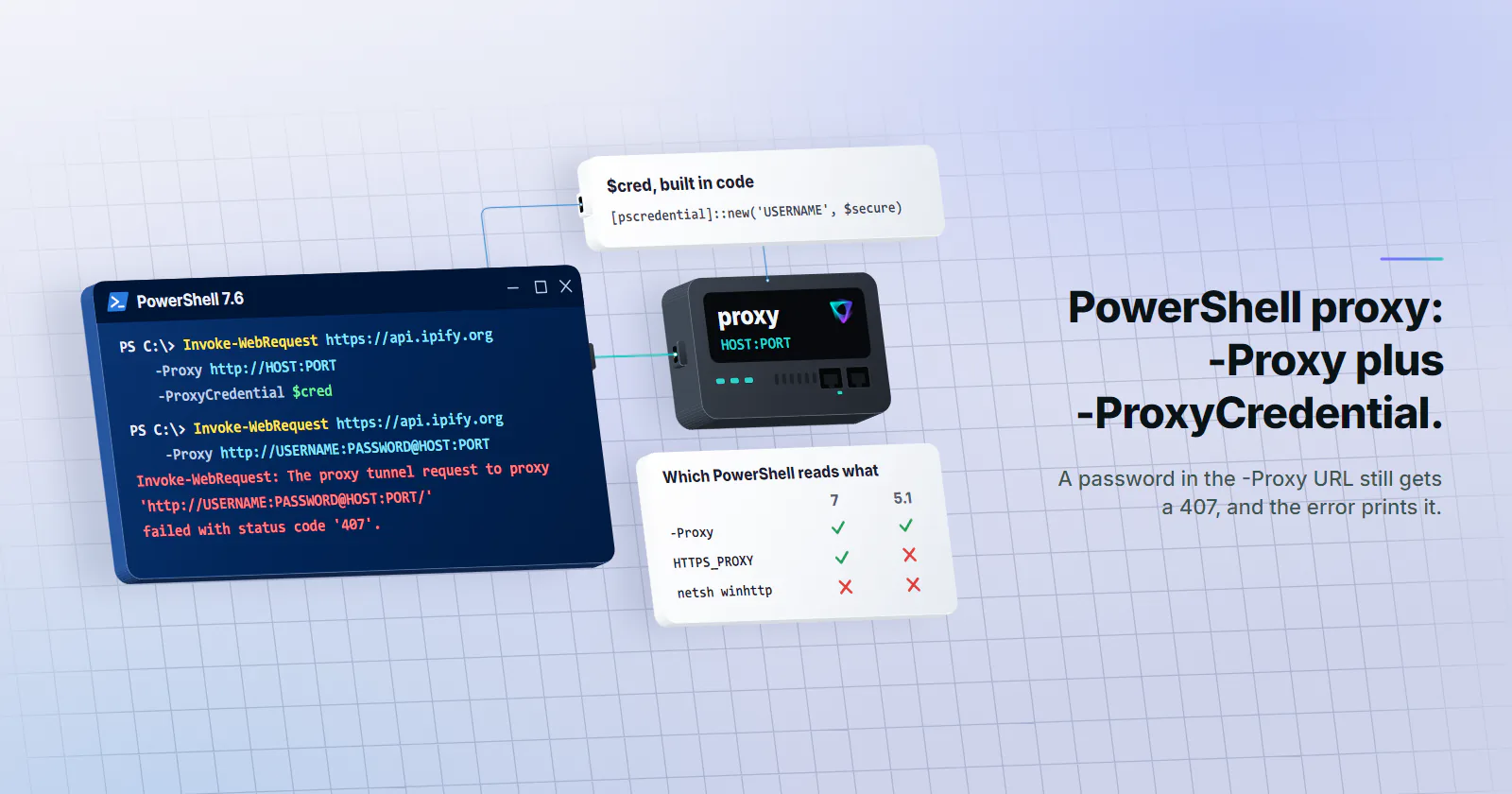
- Pass -Proxy and -ProxyCredential on the call. Invoke-WebRequest and Invoke-RestMethod both take -Proxy http://HOST:PORT plus a PSCredential, and in a script you build that credential in code, because Get-Credential just sits there waiting for a person.
- A password inside the -Proxy URL does nothing useful. You still get a 407, and the error message prints the full URL with the password in it, so it lands in your logs. Put the login in -ProxyCredential instead.
- If your proxy settings seem ignored, check which PowerShell you are in. PowerShell 7 reads HTTPS_PROXY and falls back to your user's Windows proxy; Windows PowerShell 5.1 never reads the variables, and neither of them reads netsh winhttp.
- Never start the proxy address with https://. It means TLS to the proxy itself, and with the default timeout of 0 the call can hang forever, which is a rough way to find out at 3 a.m. Use http:// or socks5://.
To use a PowerShell proxy, pass the proxy address to -Proxy and a credential object to -ProxyCredential: Invoke-WebRequest https://api.ipify.org -Proxy http://HOST:PORT -ProxyCredential $cred. Invoke-RestMethod takes the same two parameters. Build $cred with Get-Credential when you are at the keyboard, or from a stored secret in a script. In PowerShell 7, SOCKS5 works the same way with a socks5:// address.
Scripts rarely break on that line. They break further on. You get a 407 with the right password, because the password sat inside the -Proxy URL. A scheduled task hangs all night, because the address started with https:// and the default timeout is forever. Or you set HTTPS_PROXY, and PowerShell ignores it, because you are on Windows PowerShell 5.1, which never reads it.
Each of those comes from what PowerShell does under the hood, and the two shells do it differently. PowerShell 7 builds a .NET SocketsHttpHandler for every web cmdlet and hands it -Proxy as a WebProxy, as the WebRequestSession source shows (checked October 26, 2026). That is the same handler a C# app gets, so the C# HttpClient proxy guide applies almost line for line. Windows PowerShell 5.1 still runs on the old WebRequest class. Every PowerShell 7 behaviour below was reproduced on PowerShell 7.6.9.
PowerShell proxy for one request
Here is the working minimum for PowerShell 7, with the password read from an environment variable so it stays out of the script:
$secure = ConvertTo-SecureString $env:PROXY_PASS -AsPlainText -Force
$cred   = [pscredential]::new($env:PROXY_USER, $secure)

$p = @{ Proxy = "http://$($env:PROXY_HOST):$($env:PROXY_PORT)"; ProxyCredential = $cred }

Invoke-RestMethod https://api.ipify.org @p
What prints is the proxy’s exit address. For an https:// URL, PowerShell sends CONNECT api.ipify.org:443 to the proxy and runs TLS to the target inside that tunnel, so the proxy sees the hostname and port and nothing else. Splatting $p is worth the extra line, because every call that follows can reuse it with @p.
Annoyingly, PowerShell can pick up a proxy from five places, the two shells read different ones, and whichever source wins decides where your credentials have to go.
PowerShell proxy credentials
Interactive use is the easy case. $cred = Get-Credential opens a prompt, and -ProxyCredential $cred sends that login to the proxy. It is fine on your own machine and useless in a scheduled task, which has nobody to type into the prompt.
Scripts need a credential built in code. [pscredential]::new('USERNAME', $secure) with a SecureString from ConvertTo-SecureString does it, as in the snippet above. Where the secret comes from is up to you: an environment variable set by the task, a SecretManagement vault, or your CI system’s secret store. Special characters need no escaping here, so a password with @, : or # works as typed.
Credentials inside the -Proxy URL are ignored. -Proxy 'http://USERNAME:PASSWORD@HOST:PORT' runs, and the proxy still answers 407. PowerShell builds a .NET WebProxy from that URL, and WebProxy never turns the user info into a login. Worse, the error message prints the whole proxy URL, password included, so it ends up in your transcript and your CI log. This is the line that lands there (the stray quote at the end is .NET’s own):
Invoke-WebRequest: The proxy tunnel request to proxy 'http://USERNAME:PASSWORD@HOST:PORT/' failed with status code '407'."The first CONNECT always goes without credentials. PowerShell 7 opens the tunnel with no Proxy-Authorization header, reads the 407 and its Proxy-Authenticate scheme, then sends the CONNECT again with Basic credentials. So a 407 in the proxy’s own log does not mean anything failed. The 407 Proxy Authentication Required guide walks through the same status code in other clients.
-ProxyUseDefaultCredentials is for corporate proxies. It sends your Windows login (NTLM or Kerberos) to a proxy that knows your domain account. A proxy with its own username and password needs -ProxyCredential instead, and PowerShell refuses to take both on one call with WebCmdletProxyCredentialConflictException. Passing either one without -Proxy fails too, with WebCmdletProxyUriNotSuppliedException, which catches people who expected the credential to apply to the system proxy.
PowerShell 7 vs Windows PowerShell 5.1
If your PowerShell proxy settings seem to be ignored, run $PSVersionTable.PSVersion before anything else. powershell.exe and pwsh.exe are two different programs with two different networking stacks, and a scheduled task runs whichever one its action names, which is not always the one you tested in.
PowerShell 7 reads environment variables first. The Invoke-WebRequest reference (updated January 20, 2026) says that from PowerShell 7.0 the web cmdlets use HttpClient.DefaultProxy. On Windows it reads HTTP_PROXY, HTTPS_PROXY, ALL_PROXY and NO_PROXY, and only falls back to the user’s proxy settings when none is set. On Linux there is no fallback at all.
The Windows fallback is your user’s proxy, not netsh. In the .NET source, that fallback calls WinHttpGetIEProxyConfigForCurrentUser (checked October 26, 2026). That is the per-user setting under Settings, Network and internet, Proxy, the same one Internet Options shows. netsh winhttp set proxy writes a machine-wide WinHTTP setting that Windows services use, and neither PowerShell reads it. Plenty of admins set it, see no change, and lose an afternoon to it.
Ask PowerShell 7 which proxy it will use. netsh winhttp show proxy tells you nothing about pwsh, and the user proxy in the registry only matters when no variable is set. Ask the object PowerShell 7 actually reads, in the same session, before you change anything:
$dp = [System.Net.Http.HttpClient]::DefaultProxy
$dp.IsBypassed('https://api.ipify.org')   # True means the call goes direct
$dp.GetProxy('https://api.ipify.org')     # the proxy it would use
IsBypassed is the one to trust, since it applies NO_PROXY and GetProxy does not. If the proxy came from HTTPS_PROXY with a login in it, GetProxy prints that password too, so keep it out of CI logs. One catch: reading DefaultProxy freezes it for the process, so if the check shows the wrong answer and you then set $env:HTTPS_PROXY in that same window, nothing changes. Set the variable, then start a new pwsh and test there.
Windows PowerShell 5.1 uses the old WebRequest stack. It takes the Internet Options proxy, ignores the environment variables and has no SOCKS support. To see which proxy 5.1 picks for a URL, ask the object it actually uses: [System.Net.WebRequest]::DefaultWebProxy.GetProxy('https://api.ipify.org') returns the URL itself, or nothing, when the call would go direct. GetSystemWebProxy() looks similar but only reads Internet Options, so it misses a session proxy set with the line below. To set one proxy for a whole 5.1 session, the line is:
# Windows PowerShell 5.1 only. PowerShell 7 ignores this.
[System.Net.WebRequest]::DefaultWebProxy = New-Object System.Net.WebProxy('http://HOST:PORT')
[System.Net.WebRequest]::DefaultWebProxy.Credentials = New-Object System.Net.NetworkCredential('USERNAME', 'PASSWORD')
Copy that into PowerShell 7 and nothing happens: requests go direct and no error says why.
On 5.1 there is one more change that breaks old scripts. After the December 9, 2025 security update for CVE-2025-54100, Invoke-WebRequest without -UseBasicParsing stops at a “Security Warning: Script Execution Risk” prompt. In a scheduled task that looks exactly like a proxy hang, so add -UseBasicParsing before you blame the proxy.
Set a PowerShell proxy for the session
Passing @p on every call gets old fast. PowerShell 7 offers three ways to set it once.
$PSDefaultParameterValues works per cmdlet name. A default for Invoke-WebRequest:Proxy does not reach Invoke-RestMethod, which goes direct. The wildcard form covers both, and every other cmdlet with a -Proxy parameter:
$PSDefaultParameterValues['*:Proxy']           = 'http://HOST:PORT'
$PSDefaultParameterValues['*:ProxyCredential'] = $cred
To make that stick in every interactive shell, put the two lines in $PROFILE, together with whatever builds $cred. Copy only those two and $cred is empty there, so every call gets a 407. A scheduled task that starts pwsh -NoProfile skips that file, so the script still needs its own copy.
Environment variables count until the first web call. HttpClient.DefaultProxy is built on the first request, or the first time anything reads it, and cached for the life of the process. Setting $env:HTTPS_PROXY in the script before any web cmdlet runs works fine. Changing it after the first call does nothing, which is why it looks like the variable “only works before PowerShell starts”. Here the user info is read as credentials, so http://USERNAME:PASSWORD@HOST:PORT works, with a %40 for an @ in the password to be safe.
$env:HTTPS_PROXY = 'http://USERNAME:PASSWORD@HOST:PORT'
$env:HTTP_PROXY  = $env:HTTPS_PROXY
$env:NO_PROXY    = 'localhost,.internal.example'
A lowercase https_proxy beats the uppercase one on Linux and macOS, so a leftover lowercase variable in a container image wins over the one you just set. Easy to miss.
HttpClient.DefaultProxy takes a WebProxy object. Assigning [System.Net.Http.HttpClient]::DefaultProxy = $webProxy (a System.Net.WebProxy with Credentials set) before the first web call routes every cmdlet in the process that has no -Proxy of its own. It keeps the password out of the environment, which is the main reason to use it.
-NoProxy opts one call out. It skips whatever proxy the environment or the default set, which helps when a CI runner forces a proxy onto calls to an internal host. It was added in PowerShell 6.0.
Installing modules behind a proxy
Install-Module from PowerShellGet 2.2.5, which ships with PowerShell 7.6, takes -Proxy and -ProxyCredential directly. Install-PSResource from PSResourceGet has no proxy parameters at all in 7.6, so it follows the process default: set HTTPS_PROXY or HttpClient.DefaultProxy first.
SOCKS5 proxy in PowerShell
PowerShell 7 accepts socks5:// in -Proxy, and -ProxyCredential goes through the SOCKS5 username and password method from RFC 1929 (published March 1996):
Invoke-RestMethod https://api.ipify.org -Proxy socks5://HOST:PORT -ProxyCredential $credsocks5h:// throws. If you are coming from curl, this is the one that trips you up. PowerShell answers Only the 'http', 'https', 'socks4', 'socks4a' and 'socks5' schemes are allowed for proxies.
You do not need it. With socks5://, PowerShell 7 puts the target into the SOCKS request as a hostname, so DNS resolves at the proxy, which is what socks5h means in curl. On proxymint’s gateway, proxymint Lab #1 measured proxy-side resolution for CONNECT and SOCKS requests that carry the hostname.
A missing login fails at the handshake. Without -ProxyCredential, PowerShell offers the server only “no authentication”, and a SOCKS server that requires a login ends the call with SOCKS server did not return a suitable authentication method. ALL_PROXY=socks5://USERNAME:PASSWORD@HOST:PORT works too. For HTTPS targets, HTTP CONNECT and SOCKS5 both end in a tunnel with TLS inside; SOCKS5 vs HTTP proxy covers where they differ.
The https:// trap and timeouts
Whatever scheme you put in -Proxy describes the hop from PowerShell to the proxy, not the website. -Proxy https://HOST:PORT tells PowerShell to open TLS to the proxy itself. An ordinary proxy port expects a plain CONNECT line, gets a TLS ClientHello instead, and depending on the proxy either answers with junk (you see The SSL connection could not be established) or just waits.
Waiting is the nasty case. -ConnectionTimeoutSeconds, which replaced -TimeoutSec in PowerShell 7.4 and keeps it as an alias, defaults to 0, which the reference defines as an indefinite time-out. Against a proxy that waits, a call with an https:// proxy address simply never returns.
-OperationTimeoutSeconds, added in 7.4, is a separate guard: it ends a download whose stream stalls for longer than that many seconds between reads, which a slow exit can cause on large files.
Errors and what they mean
PowerShell 7 reports proxy faults through two exception types, and the text tells you which hop broke. These are the messages PowerShell 7.6 prints:
| What went wrong | What PowerShell prints | Check first |
|---|---|---|
Rejected login, https:// target | The proxy tunnel request to proxy '...' failed with status code '407'. | -ProxyCredential |
Rejected login, http:// target | Response status code does not indicate success: 407 (Proxy Authentication Required). | -ProxyCredential |
| SOCKS5 server needs a login | SOCKS server did not return a suitable authentication method. | Add -ProxyCredential |
socks5h:// in -Proxy | Only the 'http', 'https', 'socks4', 'socks4a' and 'socks5' schemes are allowed for proxies. | Use socks5:// |
| Nothing listens on the proxy port | Connection refused on Linux, No connection could be made because the target machine actively refused it. on Windows | Host and port |
| Call never returns | Nothing, until -TimeoutSec ends it with The request was canceled due to the configured HttpClient.Timeout of 30 seconds elapsing. | Scheme, firewall |
Those two 407 rows differ because the request travels differently. For an https:// URL the 407 answers the CONNECT, so it surfaces as an HttpRequestException before any response exists. For a plain http:// URL the proxy’s 407 is the response, and PowerShell throws HttpResponseException with StatusCode set, which a catch block can read from $_.Exception.Response.StatusCode. A 403 or 429 is different again: that is the website answering through a working proxy.
Sessions, reuse and rotation
Without a session, every call opens a new tunnel. Ten Invoke-RestMethod calls in a loop mean ten TCP connections to the proxy, ten CONNECTs and ten 407 round trips. For a polling script that is a lot of wasted handshakes.
-WebSession keeps one connection. Since 7.4, a session holds on to its HttpClient, so calls that share it reuse the same tunnel:
$null = Invoke-WebRequest https://api.ipify.org @p -SessionVariable s
1..9 | ForEach-Object { Invoke-RestMethod https://api.ipify.org @p -WebSession $s }
Decide which one you want before you copy that loop. An https:// tunnel is a single TCP connection from the exit to the website, so every call that reuses it arrives from the same address: good for a login that must hold, wrong for a job that wants a fresh address per call. For the second kind, leave -WebSession off. On a per-GB proxymint order, rotation (a new IP every request, a 5 to 60 minute timer, or sticky) is picked when you order and can be changed later without new credentials. Rotating vs sticky proxies explains what breaks under each.
Verify the exit IP
Compare a direct call with a proxied one, and count distinct exits with and without a session:
$echo = 'https://api.ipify.org'
"direct:  $(Invoke-RestMethod $echo -NoProxy)"

$fresh  = 1..10 | ForEach-Object { Invoke-RestMethod $echo @p -TimeoutSec 30 }
$null   = Invoke-WebRequest $echo @p -SessionVariable s -TimeoutSec 30
$pooled = 1..10 | ForEach-Object { Invoke-RestMethod $echo @p -WebSession $s }

"new tunnel per call: $(($fresh  | Sort-Object -Unique).Count) distinct exits"
"one session:         $(($pooled | Sort-Object -Unique).Count) distinct exits"
If the addresses in $fresh or $pooled match the direct line, the proxy is not in use. Use an https:// echo endpoint: Lab #1 found that proxymint’s gateway answers plain http:// requests with a 301 to the https:// URL, so an http:// check ends up testing something else.
Which PowerShell proxy type fits
Your PowerShell proxy code is the same for every proxy category. What changes is the address that leaves the gateway, and that follows from the target.
API polling, uptime checks and monitoring scripts: datacenter proxies. Most admin scripts call APIs and endpoints that do not score where traffic comes from, and hosting addresses are fast and consistent for that.
Public pages that treat home users differently (prices, stock, search results by location): rotating residential proxies, rotating per request for coverage or on a 5 to 60 minute timer when a short session must hold.
One fixed address for weeks (a partner API that only accepts a known IP, a dashboard login): static ISP proxies, one ISP-registered address for the whole term.
All three take a username and password over HTTP and SOCKS5, so the -Proxy http://... and -Proxy socks5://... forms above work unchanged on each. If the target is lenient and the job is volume, start with datacenter; if the page changes for home visitors, residential; if the other side needs one IP it can recognise, static ISP.
Frequently asked questions
Add -Proxy with the proxy address and -ProxyCredential with a PSCredential, for example Invoke-WebRequest https://api.ipify.org -Proxy http://HOST:PORT -ProxyCredential $cred. Invoke-RestMethod takes the same parameters. Keep the scheme http:// or socks5://, even for https:// websites, which travel through a CONNECT tunnel.
Build the credential in code: convert the password with ConvertTo-SecureString and create [pscredential]::new(username, securePassword), then pass it to -ProxyCredential. Read the password from an environment variable, a SecretManagement vault or your CI secret store rather than the script. Credentials written into the -Proxy URL are ignored and the proxy answers 407.
Usually the setting is in a place that version does not read. PowerShell 7 reads HTTP_PROXY and HTTPS_PROXY once, at the first web call, then falls back to the user's Windows proxy; Windows PowerShell 5.1 ignores the variables. Neither reads the machine-wide netsh winhttp proxy, and the 5.1 line [System.Net.WebRequest]::DefaultWebProxy has no effect in PowerShell 7. To see what PowerShell 7 will do, run [System.Net.Http.HttpClient]::DefaultProxy.IsBypassed('https://example.com'): False means the call goes through a proxy.
Set $PSDefaultParameterValues[':Proxy'] and $PSDefaultParameterValues[':ProxyCredential'] at the top of the script. In PowerShell 7 you can instead set $env:HTTPS_PROXY or [System.Net.Http.HttpClient]::DefaultProxy before the first web cmdlet runs. In Windows PowerShell 5.1 the equivalent is [System.Net.WebRequest]::DefaultWebProxy.
PowerShell 7 does: use -Proxy socks5://HOST:PORT with -ProxyCredential, and the login goes through the SOCKS5 username and password method. The socks5h scheme is rejected with NotSupportedException, but PowerShell already sends the hostname to the proxy with socks5. Windows PowerShell 5.1 has no SOCKS support.
Add -NoProxy to the call, which skips any proxy set by environment variables or the session default. To exclude hosts for the whole process in PowerShell 7, list them in NO_PROXY, where an entry like .internal.example matches the domain and its subdomains.
Install-Module from PowerShellGet 2.2.5 takes -Proxy and -ProxyCredential directly. Install-PSResource from PSResourceGet has no proxy parameters in PowerShell 7.6, so set HTTPS_PROXY or HttpClient.DefaultProxy before it runs.
Researched and drafted with AI tools, then checked against our publishing rules before it went live: 4 outside links, 9 links to other proxymint pages, no prices and a fact-check pass against our product records. How we write.