Browser profile proxy setup: one proxy, WebRTC and DNS
Set up one proxy per browser profile: own credentials per profile, the proxy type for each job, and how to check WebRTC, DNS and language before login.
Quick summary · TL;DR
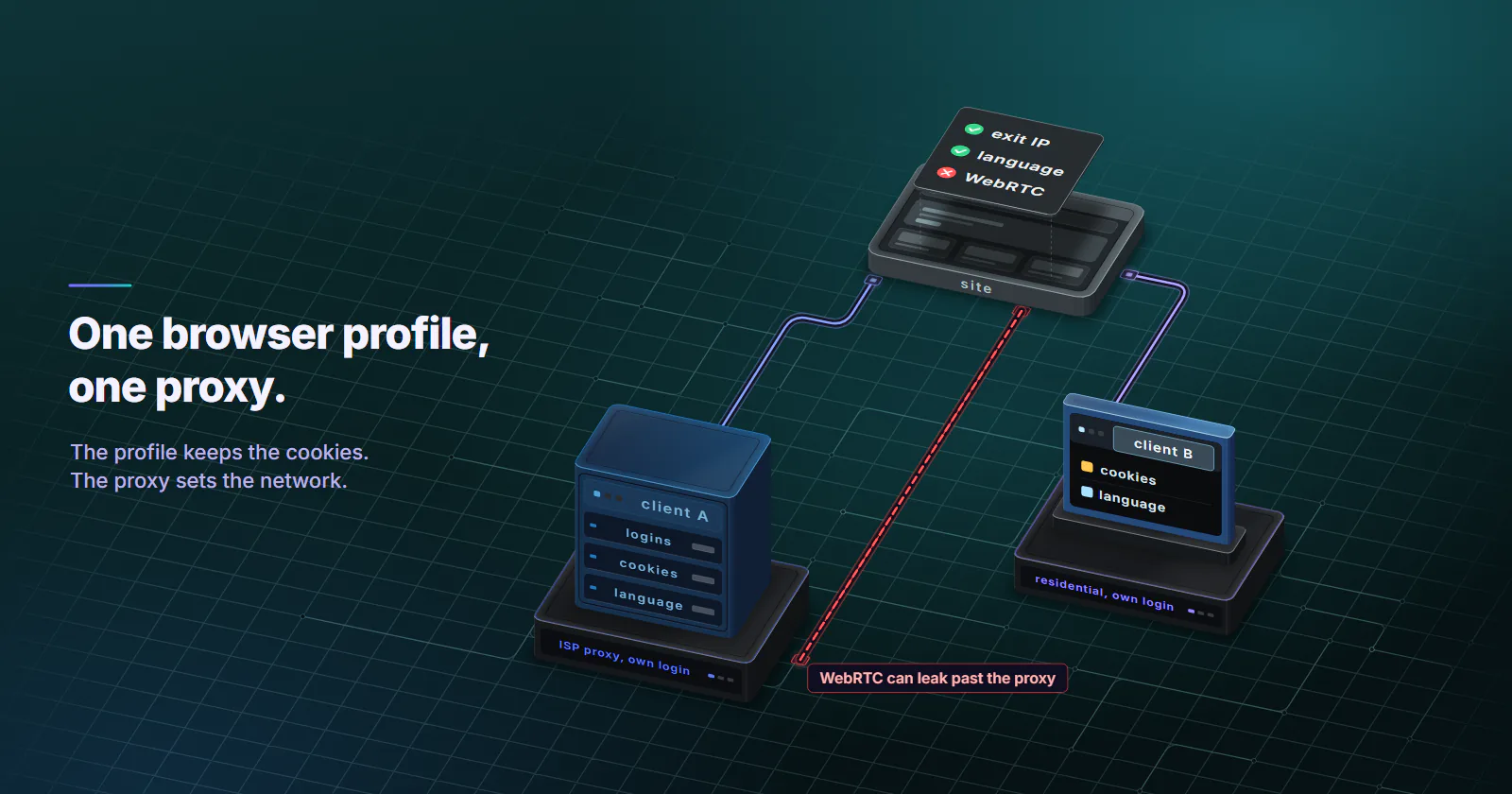
- A browser profile proxy setup gives each profile its own proxy. The profile keeps its own cookies, saved logins and settings such as language; the proxy decides where its traffic leaves from: IP, network, country and city.
- One profile, one proxy, one set of credentials. Each client's sessions stay on one consistent address, and no profile carries another client's proxy login.
- Pick the tier by the job. ISP for long-lived logins, residential with a sticky timer for logged-out ad checks, mobile for app-first accounts, datacenter IPv4 for QA on your own sites.
- WebRTC and DNS are the usual leaks. RFC 8828 notes that HTTP and most SOCKS proxies carry no UDP, so set WebRTC to proxy-only, and confirm that names resolve on the proxy side.
- Verify inside the launched profile before the first login. Check exit IP, language, WebRTC, DNS resolver and IPv6, and run it again after any exit change.
A browser profile proxy setup assigns one proxy to one browser profile. The profile keeps its own cookies, logins and settings; the proxy decides where its traffic leaves from. A clean setup gives each profile its own proxy and credentials, sends WebRTC and DNS through that proxy, and sets the language for the market the job serves. One profile needs one proxy.
Every profile manager asks for the same five proxy fields, so this guide names no tools. The problems people hit sit between the proxy and the profile: a WebRTC test that shows the office IP, DNS lookups that leave through the office network, two clients’ profiles sharing one proxy login, a login that works on Monday and asks for a security code on Tuesday. It is written for agencies working in client accounts with the client’s permission, and for ad verification, QA and localisation testing.
What browser profile proxy setup means
A browser profile is a separate browser state on one machine: its own cookies, saved logins, local storage and settings such as language and screen size. Tools that manage many profiles exist as commercial apps and as open-source projects; the proxy side is identical in all of them. None of them changes the IP address. That is the proxy’s job.
So the setup has two layers, and each one owns different settings. Knowing which layer owns a setting tells you where to fix it when a check fails.
What the proxy sets vs the profile
The proxy owns the network layer. The profile owns its own state and what the browser sends about itself.
Language. Language comes from navigator.language (MDN, checked September 2026) and from the Accept-Language header the browser sends. Both belong to the profile, and a proxy cannot set either. Set them to the market whose pages the job needs: de-DE for a German storefront, fr-FR for a French ad check.
One profile, one proxy, and why
Cookies, saved logins and a site’s security history attach to an IP and a location. It is ordinary account security; a bank asks for a code when a login arrives from a new city.
Two profiles on one IP share that history. One profile that hops between IPs logs in from a new place every session, and each hop can trigger the security checks the account owner then has to clear.
For an agency, each client’s accounts stay on one consistent location, their own. A security check or an expired session on one client’s profile never touches another client’s work, and a new staff member picks up the same profile from the same place. That is the reason for one proxy per browser profile: session consistency and client separation, with the client’s permission, on accounts the client owns.
Credentials per profile
The proxy login belongs to the profile, the same way the cookies do. On static ISP proxies each IP comes with its own username and password, so ten profiles hold ten separate logins. On residential and mobile, an order arrives as a list: one gateway host, one username and password, and many ports. Give each profile its own port, and keep each client on its own order, so no profile carries another client’s login.
It also limits the damage of a mistake. A profile exported to a colleague, or a settings screenshot in a support ticket, exposes one client’s proxy, not every client’s. Keep the credentials in the profile’s proxy field, not in a shared document next to it.
Which proxy type for which job
The last column is how each tier is billed; rates are on the pricing page.
| Job | Tier | Session setting | Why | Billing |
|---|---|---|---|---|
| Agency running long-lived logins in client accounts | ISP | One IP per profile, no rotation | The address is assigned to your order for the whole billing term | Per IP per month |
| Ad verification across markets, logged out | Residential, city targeting | Sticky timer, 5-60 minutes per check | Home-network exits in the market being checked | Per GB |
| App-first accounts, or checking how a site serves mobile networks | Mobile | Sticky while the device stays online | Exits classified as cellular by MaxMind | Per GB |
| QA of geo and locale features on your own or a staging site | Datacenter IPv4 | One port per profile | Your own site does not score ASNs | Per port per month |
| Logged-in social or marketplace profile | Not datacenter; never per-request rotation | - | Platforms that score network type treat hosting ranges as a weaker fit for logins; a new IP per request breaks the session | - |
The agency case. Static ISP proxies are the default for profiles that stay logged in. Each IP is an ISP-registered address with its own username and password, chosen by country, not metered per GB and with no bandwidth cap. Ten client profiles need ten IPs. ISP proxies covers how those addresses are registered.
The per-GB tiers. Rotating residential proxies and mobile proxies bill traffic, not profiles. How many GB one profile uses per day depends entirely on the sites it opens: a dashboard with a few API calls is light, a video-heavy ad check is not. Measure one real session before sizing a package; no honest per-profile figure exists without that measurement.
Where each tier fits. Datacenter’s own product page lists social platforms and marketplaces as a misfit; it fits QA on your own and staging sites. Mobile fits app-first accounts; a desk-based team that needs one fixed login location is better served by a static ISP address held for the term.
Sticky vs rotating inside a profile
Per-request rotation breaks a logged-in profile. Every page load arrives from a different address, and the login fails or asks for verification.
Inside a profile, use one of two settings. On ISP there is nothing to choose: the address is the product. On residential or mobile, pick a sticky setting, either a timer from 5 to 60 minutes or sticky for as long as the device stays online. Rotation is set per order and can be changed later with the same credentials.
Residential exits are home connections and mobile exits are classified as cellular by MaxMind; devices go offline, so even a sticky exit can change. ISP is the tier that holds one address for the whole billing term. That is why it leads for anything logged in for weeks.
Setting up one proxy per profile
Every profile tool uses the same fields, so a browser profile proxy setup works from these steps without screenshots.
- Order in the location the job needs. ISP and datacenter IPv4 are chosen by country; residential and mobile by country, region and city, from locations with devices online when you order. Copy the host, port, username and password.
- Create one profile per proxy. Name it after the client or market, not the IP, so a replaced IP does not break the naming.
- Open the profile’s proxy settings. Pick HTTP and paste the four fields, with that profile’s own login or port. HTTP and SOCKS5 are both included on every proxymint tier; HTTP is the simplest choice in a Chromium-based profile and carries HTTPS sites through CONNECT.
- Set the language for the market. The profile language drives navigator.language and Accept-Language. Set it to the market whose pages the job needs, for example de-DE for a German storefront.
- Set WebRTC to go through the proxy only, or to replace the local address with the proxy’s. Never leave it on the setting that exposes the real address.
- Launch and run the verify checklist below before the first login.
HTTP or SOCKS5. Both work in Chromium-based profiles. With an HTTP proxy the hostname travels inside the CONNECT request, so the proxy side resolves it. A Chromium SOCKS5 proxy also receives the hostname rather than a locally resolved IP. Either way, the TLS handshake is the browser’s own, carried end to end through the tunnel. Neither choice adds UDP, which matters for WebRTC below. And stock Chromium does not support username and password authentication for SOCKS5, per Chromium’s proxy documentation (checked September 2026). Profile tools that accept SOCKS5 logins add that layer themselves, which is why HTTP is the safer default for username and password proxies. The two protocols are compared in SOCKS5 vs HTTP proxy.
Without a profile manager
A profile manager is optional. Chrome keeps fully separate profiles when each one launches with its own --user-data-dir folder, and --proxy-server on the same command line points that profile at its own proxy:
chrome --user-data-dir="$HOME/profiles/client-a" --proxy-server="http://HOST:PORT"Chrome then asks for the proxy username and password in a sign-in prompt. It takes no SOCKS5 credentials, so use the HTTP endpoint. Firefox keeps network settings per profile: create one profile per client in about:profiles and set its proxy under Settings, Network Settings.
Verify inside the profile before login
The check that counts in any browser profile proxy setup runs inside the launched profile. A “check proxy” button in a profile manager may test the proxy from the app itself rather than from the running browser, so it can pass while the profile still leaks a WebRTC address or sends DNS lookups through your own network.
Open three pages from inside the profile: an IP lookup, a WebRTC test and a DNS leak test. Neutral examples are browserleaks.com’s WebRTC test and ipleak.net, both checked September 2026. Then mark each line pass or fail.
- Exit IP and country. Pass is the IP and country you ordered; fail is your own network’s IP, or a different country.
- Language. Pass is the market the job needs, for example de-DE for a German storefront; fail is your machine’s default when the job needs another market.
- WebRTC. No candidate other than the proxy’s IP is a pass; your host network’s public or local IP is a fail.
- DNS resolver. Pass is a resolver on the proxy side; fail is your ISP’s or office resolver.
- IPv6. Pass is no IPv6 address shown, or only one that belongs to the exit; fail is an IPv6 address from your own connection.
DNS resolver. The resolver a test page reports depends on where the provider resolves names, so it does not have to be the exit’s home ISP. We measured proxymint’s residential and mobile gateway in September 2026: over HTTP CONNECT, names resolved on the proxy side, through public resolvers such as Google’s or Cloudflare’s (US resolvers for our US test exits), and no Via or Forwarded header reached the site. Inside a CONNECT tunnel the proxy only relays encrypted bytes, so it cannot add X-Forwarded-For either. So on those tiers a public resolver such as Google or Cloudflare is a pass; the failure to act on is a resolver that belongs to your own network. With another provider, a resolver in a different country is worth one support question before it becomes a reason to rebuild the setup. Fixes per client are in the proxy DNS leak guide.
IPv6. A machine with IPv6 on its own connection and an IPv4-only proxy can expose a v6 address, most often through WebRTC. If the checklist shows one, turn IPv6 off for the profile or at the network adapter.
WebRTC over an HTTP proxy
WebRTC is the usual leak, and the reason is in the standard. RFC 8828 (IETF, January 2021) defines four IP handling modes for WebRTC. Its mode 4, “Force proxy”, sends WebRTC media through the configured proxy, and notes that HTTP proxies and most SOCKS proxies do not support UDP. In that case UDP is disabled and media falls back to TCP through the proxy.
The RFC’s recommended default without user consent is mode 2, which follows the machine’s normal routing table. So a profile left on its default can send WebRTC traffic straight from the host network and show the host’s real address, even though every page load goes through the proxy.
In step 5, “through the proxy only” is mode 4 in practice: WebRTC keeps working over TCP or stops, and no host address appears. “Replace the local address” hides the address in the candidates. Either passes the checklist. The default does not.
Re-check when the exit changes
On residential and mobile, a sticky exit can change mid-session when the device goes offline. After any exit change, relaunch the profile or run the checklist again, so the profile is confirmed on the ordered location with no WebRTC or DNS leak. On ISP this rarely comes up, because the address does not change during the term. When profiles are driven by scripts through a tool’s local automation API, the same pattern applies: check the exit IP first, then start the job. Playwright proxy shows that pattern in code.
What the platforms’ rules say
Profile managers are ordinary software. The rules that matter are about the accounts, and each platform publishes its own.
Meta. Meta’s Terms of Service (effective January 1, 2025, section 3.1, checked September 2026) ask each person to create only one account, their own, and not to share the password or give others access to it. For agencies, Meta’s own route is partner access (checked September 2026): the client adds the agency’s business portfolio ID as a partner in the client’s business portfolio settings and chooses which Pages and ad accounts it gets, and at what access level. No one holds a client’s personal login.
Google Ads. Google’s Circumventing systems policy (checked September 2026) treats violations as egregious. Its examples include creating new accounts to re-enter the system after a suspension, and spreading policy-violating ads across 2 or more accounts. The permitted way to run many client accounts is a manager account (checked September 2026): one sign-in to linked client accounts, which Google describes as suited to agencies managing multiple clients.
Platform routes first. For many agency tasks on Meta and Google, partner access or a manager account removes the need for a separate profile holding the client’s login at all. A profile and a proxy never make an account permitted, never lift a restriction, and never replace the platform’s own access route. Where a team does need a steady login location, for example staff in several countries working one client’s account, a profile per client on a fixed ISP address keeps that history consistent.
Frequently asked questions
Yes. Cookies, saved logins and a site's security history attach to an IP and location. Two profiles on one IP share that history, and one profile hopping between IPs logs in from a new place every session, which the account's own security checks ask the owner to confirm. One proxy per profile keeps each client's accounts on one consistent location, and per-profile credentials keep one client's proxy login out of another client's profile.
Three usual causes: the profile is not using the proxy at all, because an empty or mistyped proxy field sends traffic from your own network; a sticky residential or mobile exit changed after launch; or the IP database used by the test page places the exit somewhere other than the ordered location. Check the proxy field first, then run the checklist again.
Both work in Chromium-based profiles and both carry HTTPS sites through the tunnel. HTTP is the simpler default for username and password proxies, because stock Chromium supports no SOCKS5 authentication. Neither adds UDP, so WebRTC still needs the proxy-only setting.
proxymint sells proxies, not browsers, so this guide does not rank the tools. Whatever tool is chosen should offer a proxy field and credentials per profile, a WebRTC mode that sends traffic through the proxy only, a language setting per profile, and a local automation API if profiles are scripted. The deciding test is the in-profile checklist: exit IP, language, WebRTC, DNS and IPv6.
Some tools bundle free proxies, and public lists of free proxies exist too. Every user of the tool shares those exits, their history is unknown, and they rarely offer a fixed IP or city targeting. They are fine for a throwaway test profile, not for a client's account.
Mobile proxies fit app-first accounts and checks of how a site serves mobile networks. proxymint's mobile exits are classified as cellular by MaxMind; set a sticky session so one exit holds through the work. For desk-based work on desktop profiles, a fixed ISP address is the steadier choice.
The software is legal in most places, and so are proxies. What matters is each platform's terms and what the accounts are used for: Meta asks for one personal account per person, and Google Ads treats creating accounts after a suspension as an egregious violation. This is not legal advice.
Researched and drafted with AI tools, then checked against our publishing rules before it went live: 8 outside links, 8 links to other proxymint pages, no prices and a fact-check pass against our product records. How we write.